


Free AI LinkedIn Headline Generator
Create a professional LinkedIn headline in seconds with Landingi’s free AI LinkedIn Headline Generator, designed to help you write engaging headlines that instantly strengthen your LinkedIn profile. Instead of staring at an empty headline field and guessing what might work, you can generate clear, role-focused, and keyword-rich headlines that fit LinkedIn’s character limit and match your career goals.
Your headline is one of the first elements people see on your profile. Recruiters, clients, and potential employers decide within seconds whether to click or scroll. That moment determines your visibility and whether you make a powerful first impression. This is why your headline is a performance element, not a formality.
What is a LinkedIn Headline Generator?
A LinkedIn Headline Generator is an AI tool that automatically creates headline suggestions based on your role, skills, achievements, expertise, and career focus.
Instead of writing everything from scratch, you provide basic inputs such as your job title, industry, or value proposition. The generator then produces multiple headline options using proven structures, keyword placement, and LinkedIn-friendly formatting tailored to your target audience.
You can also think of it as:
- a LinkedIn headline creator,
- a LinkedIn profile headline generator,
- an AI headline writer for LinkedIn,
- or a professional headline generator focused on personal branding and positioning within your company or industry.
Each option serves the same purpose: helping you quickly create a headline that communicates who you are and why someone should care, without reducing your experience to a vague summary.
How to Use the LinkedIn Headline Generator?
To create your LinkedIn headline, follow these quick steps: describe your professional experience and achievements, select the language, and generate headline suggestions with one click. This simple process helps you turn raw career information into clear, keyword-focused headlines without overthinking structure or wording.
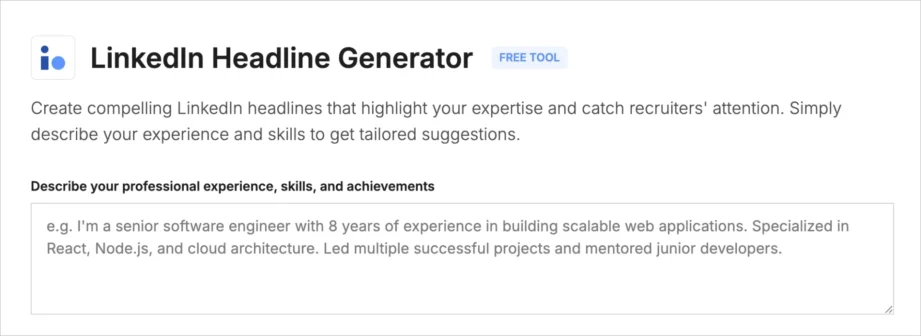
Step 1: Describe your professional experience, skills, and achievements
Start by writing a short but specific description of your professional background in the text field. Include your current role, key skills, industry focus, and measurable achievements. For example, if you’re a marketing manager, mention channels you manage, growth metrics, or notable campaigns.
The more concrete your input, the more relevant and performance-focused the generated headlines will be, giving the AI better context to generate strong ideas.
Step 2: Select the language for your headline
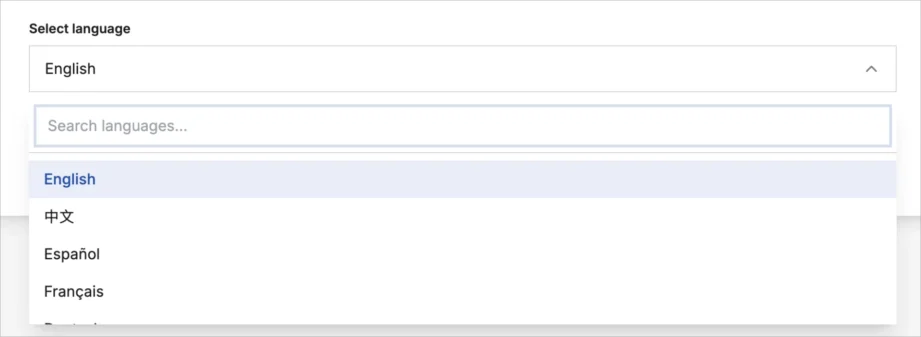
Choose the language in which you want your LinkedIn headline to be generated. This is especially useful if you work in international markets or manage more than one LinkedIn account.
The generator adjusts wording and structure to match the selected language, helping your headline sound natural and professional.
Step 3: Generate LinkedIn headline suggestions
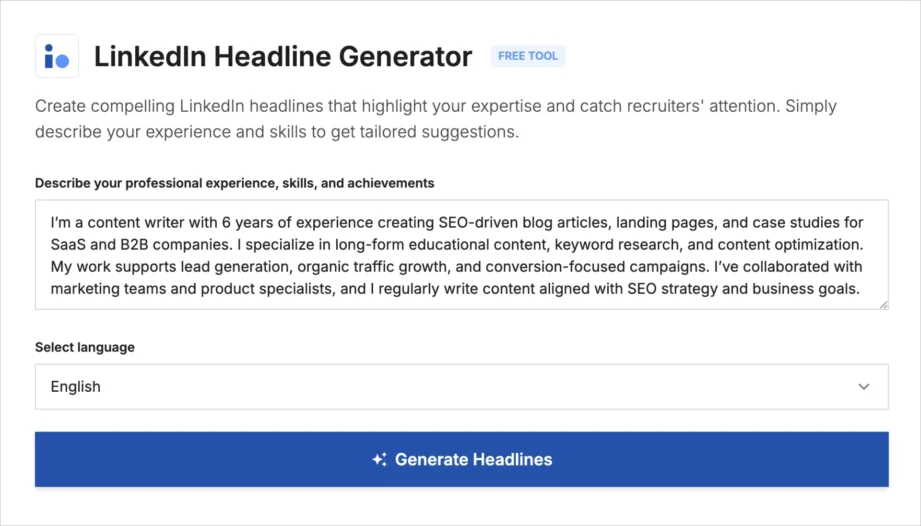
Click Generate Headlines to receive multiple LinkedIn headline options based on your description and selected language.
The generator analyzes your input and produces headlines that fit LinkedIn’s format, character limit, and common recruiter search patterns. That way, it is easier to create compelling headlines without trial and error.
Step 4: Review, select, and refine your headline
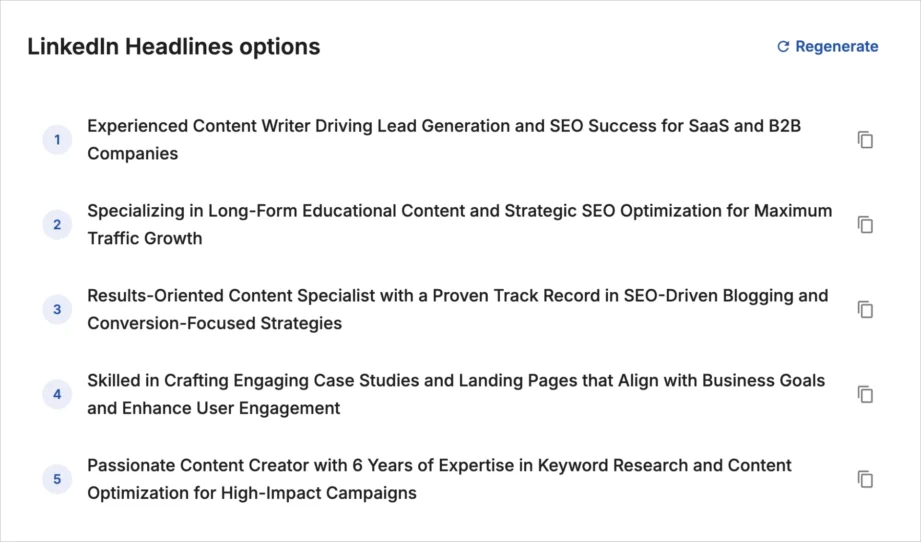
Review the generated headlines, choose the one that best reflects your role and goals, and adjust wording if needed. You can regenerate headlines at any time by refining your input or adding clearer achievements, numbers, or keywords.
Best Practices for Writing a LinkedIn Headline
An effective LinkedIn headline clearly states what you do, who you help, and what results you deliver. The strongest headlines rely on specifics instead of generic job titles, include keywords recruiters search for, and focus on measurable results rather than responsibilities. The goal is not just a catchy line, but a perfect LinkedIn headline that supports your long-term professional brand.
If you want your headline to perform well in search results and recruiter feeds, follow these rules:
- Use specifics instead of job titles alone. Replace vague labels like “Marketing Specialist” with concrete descriptors such as channels, industries, or outcomes. Headlines with numbers and achievements perform 60% better than generic descriptions, according to Contentin.
- Include keywords recruiters actually search for. Add skills, tools, or roles that match how recruiters search on LinkedIn, for example “Paid Media Manager,” “B2B SaaS Copywriter,” or “Frontend Developer React.”
- Highlight results, not responsibilities. Focus on outcomes such as revenue growth, leads generated, campaigns scaled, or years of experience. This aligns with how LinkedIn ranks and displays profiles.
- Keep it readable within the character limit. LinkedIn headlines have limited space, so remove filler words and prioritize clarity. Short phrases separated by vertical bars or dashes often work best.
- Update your headline as your role changes. Your headline should reflect what you want next, not only what you did in the past. Regular updates help maintain relevance in LinkedIn search.
Using these principles consistently explains why profiles with optimized headlines receive 30% more views, as noted by Melanie Goodman.
Boost Your Personal Brand with Landingi Free LinkedIn Headline Generator
Landingi’s free LinkedIn Headline Generator helps job seekers and professionals apply proven headline principles without endless rewrites or guesswork.
Whether you’re actively job hunting or quietly aligning your profile with future career aspirations, the AI-powered tool helps you:
- translate experience into clear positioning,
- highlight achievements in a recruiter-friendly format,
- and create headlines that align with LinkedIn search behavior.
You stay in control of the content, while the LinkedIn Headline Generator speeds up the process and removes friction. Whether you are updating your profile for a job search, repositioning as a consultant, or refining your personal brand, the tool helps you move faster with more confidence.
A strong LinkedIn headline directly affects how often your profile is viewed, clicked, and contacted. With Landingi’s free generator, you can test, refine, and improve your headline in minutes – using data-backed structures instead of guesswork.
Discover more free tools
Free UTM Builder
Build UTM links and track campaign performance accurately
Free QR Code Generator
Generate QR code that sends users to your landing page
Free AI Hook Generator
Grab attention instantly with the first sentence
Free AI CTA Generator
Create high-converting CTA for landing pages
Free AI Sales Email Generator
Write better cold emails to scale outreach
Free AI LinkedIn Headline Generator
Create professional LinkedIn headline in seconds
Free SEO Title Length Checker
Check if your page title is the right length for Google


