


SEO Title Length Checker for Digital Marketers
Check if your page title is the right length for Google – instantly. The title tag might be short, but it pulls serious SEO weight. It’s the first thing people see in search and one of the strongest signals Google uses to understand your page. According to Backlinko, title tags between 40 and 60 characters long get 33.3% more clicks than those outside that range.
The SEO Title & Description Checker helps you write titles that are clear, complete, and fully visible without getting cut off in search results.
In this guide, we’ll walk you through how to get the most out of every title tag.
Key takeaways:
- How to check if your title and meta description fit Google’s display limits
- What makes a strong, search-friendly title tag
- Which common SEO mistakes to avoid if you want more clicks
Let’s make sure your next title gets seen and clicked.
What is an SEO Title Length Checker?
A SEO title length checker is a tool that measures the pixel width of your page title to make sure it fits within Google’s display limits and won’t get cut off in search results.
It measures the pixel length of your SEO title (not just the character count) so you can preview how your title tag will look on both desktop and mobile. If your title or meta description is too long, you’ll know before hitting publish. That’s key, because Google trims by pixels, not characters. A title that’s too wide might get chopped mid-sentence, making your page look incomplete or unclear in search engine results.
Using a title and description checker keeps your titles sharp, complete, and fully visible, so they earn clicks, not confusion.
How to Use the SEO Title Length Checker
To verify your title, simply follow these steps:
Step 1. Enter your page URL or start from scratch
If your page is live, paste the URL into the top field and click “Fetch Metadata.” The tool will automatically load your current title tag and meta description.
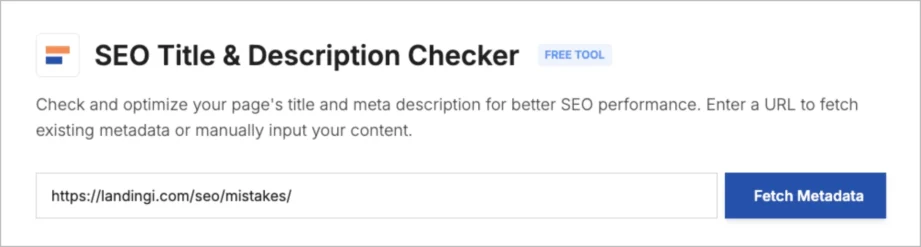
Working on a draft? No problem. Just leave the URL field blank and move on to the next step.
Step 2. Type your title into the “Title” field
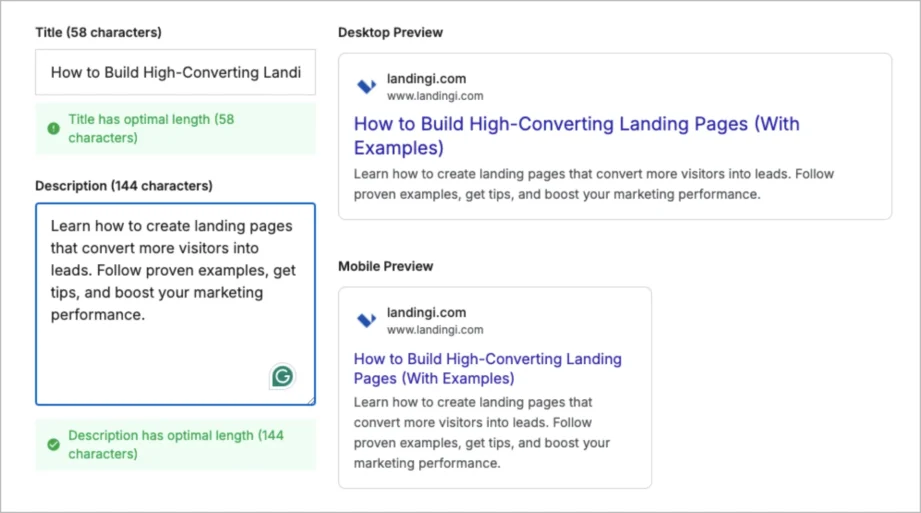
As you enter your text, the character count updates in real time along with a status that tells you if the title is too short, too long, or the optimal length. You’ll also see a live snippet preview showing exactly how your title will appear in Google, on both desktop and mobile.
Step 3. Add your meta description
In the field below, enter the meta description you want to test. The tool tracks both character count and pixel width, so you’ll know instantly if it fits within Google’s display limits (typically around 920 pixels or 150–160 characters).
Step 4. Review the preview and make final tweaks
On the right, you’ll see a real-time preview of your Google snippet. This is where you’ll catch anything that gets cut off or looks awkward. Edit directly in the fields until both your title and description are marked as optimal.
Step 5. Test different versions
Want to compare variations? You can make quick changes to the copy and see the results instantly – perfect for A/B-style testing before publishing.
Why Should You Check SEO Title Length?
You should check SEO title length to make sure your page title doesn’t get cut off in search engine results, because when it does, you lose clarity, clicks, and credibility. A poorly trimmed title tag can confuse both users and search engines, hurting your visibility and click-through rate.
Google typically displays up to 600 pixels for a meta title and around 920 pixels for a meta description (Moz, 2022). That’s about 50–60 characters for titles and 150–160 characters for descriptions, but it’s not just about counting characters. It’s about how those characters display in pixels. Some letters (like W or M) are wider than others, which means two titles with the same character count can take up very different space.
That’s why using a pixel-based SEO title length checker is more accurate than going by numbers alone. It gives you a live preview of your title and meta description, so you can be sure your content looks clean, clickable, and complete – across desktop and mobile devices.
Example:
Let’s say your original title tag is: Top Tools for Agencies
At just 23 characters, it’s short and vague. It doesn’t tell the user what kind of tools, what problem they solve, or why it matters.
You rewrite it to: Top Landing Page Tools for Agencies and Freelancers
Now you’re at 56 characters – keyword-rich, specific, and still within the recommended limit.
But if you go too far with: Top Landing Page Tools for Agencies and Freelancers That Boost ROI Fast
That’s 76 characters. It might look fine in your editor, but Google will likely cut it off mid-sentence, reducing the impact in the search snippet preview and possibly confusing users.
That’s exactly where a free SEO title checker comes in. It shows you in real time how your title and description will appear in Google search results, both on desktop and mobile. You can instantly fix what’s too long, too short, or unclear before it affects your search engine visibility or website traffic.
Best Practices for Writing SEO Titles
Well-optimized SEO title tags help you rank higher in search engine results pages, earn more clicks, and keep control over how your page title appears across Google – from mobile devices to browser tabs. Here’s how to get them right:
• Include the primary keyword
Your main target keyword should appear in every title tag. Place it as close to the beginning as possible especially if it matches search intent. This helps search engines understand your page and increases your chances of being found.
Example: Landing Page Builder for Agencies – Free Templates Included
• Keep it between 50–60 characters
Stay within 600 pixels to avoid cutoffs in Google results. Too short? You risk sounding vague. Too long? You lose visibility.
Pro tip: Focus on clarity first. Then check the pixel width using a title length checker to make sure everything fits.
• Use engaging words, numbers, and dates
Words like guide, checklist, free, actionable, or updated make your title feel more useful. Numbers add structure. Dates signal fresh content, especially in AI-heavy SERPs.
Example: “7 Proven Email CTA Examples That Boost Clicks (2026)” vs “How to Write Better CTAs” – less specific, less clickable.
• Add long-tail keywords if it flows naturally
Phrases like how-to, examples, or for beginners can help you appear for broader or more specific searches. Just avoid keyword stuffing – it hurts readability and SEO.
Example: “SEO Checklist for Small Businesses – How to Get Started”
• Update your titles with the current year
Adding the year makes content feel up to date, especially useful for listicles, software reviews, or best-of pages.
Example:“Best Landing Page Software for SaaS Startups in 2026”
• Prioritize high-potential pages
Don’t try to rewrite every title on your site. Start with the ones already ranking on page 1 or 2. Improving those titles can lift CTR fast. Use Google Search Console to find pages with high impressions but low clicks, and test better titles there first.
Optimize Your SERP Appearance with Landingi SEO Title Length Checker
Your page title is often the first impression you make in search and it can be the difference between getting clicked or getting skipped. If it’s too long, unclear, or doesn’t reflect what the page is about, it might get trimmed or rewritten by Google. That’s when you lose control over how your content appears.
The Landingi SEO Title & Description Checker was built to help with exactly that. It lets you check the actual pixel length of your title tag and meta description, so you can see how they’ll look in real search results both on desktop and mobile. You can enter a live URL or write from scratch, adjust the copy, and instantly preview your snippet before publishing.
It’s a small step, but it gives you a lot more confidence that your content will show up the way you intended clear, complete, and ready to earn the click. The tool is completely free to use – no login, no setup.
Discover more free tools
Free UTM Builder
Build UTM links and track campaign performance accurately
Free QR Code Generator
Generate QR code that sends users to your landing page
Free AI Hook Generator
Grab attention instantly with the first sentence
Free AI CTA Generator
Create high-converting CTA for landing pages
Free AI Sales Email Generator
Write better cold emails to scale outreach
Free AI LinkedIn Headline Generator
Create professional LinkedIn headline in seconds
Free SEO Title Length Checker
Check if your page title is the right length for Google


