
A splash page is a single-purpose web page that appears before a visitor accesses the main content of a site. It’s often used for announcements, limited-time offers, lead capture, age verification, language selection, or highlighting a product or campaign. Unlike a homepage or a full landing page, a splash page has one clear goal: to deliver a message quickly and prompt a specific action before guiding users further.
While splash pages might look simple, their usefulness depends on what happens before visitors reach the main site. A splash page works best when it communicates one message, asks for one decision, and removes anything unrelated to that decision. Whether you’re launching a product, building your email list, or showcasing a time-sensitive promo, the page should make that first decision clear without unnecessarily delaying access to the main content.
In this article, you’ll find 16 splash page examples to inspire your next campaign. You’ll also get practical guidance on layout, CTA placement, forms, mobile usability, and page speed – and how to quickly build a splash page yourself using Landingi’s ready-to-use templates.

What Is a Splash Page?
A splash page is a single-page introduction that acts as a bridge to the rest of a website. Unlike a traditional homepage, this page type appears before users can access the site’s main content. It’s designed to grab attention and encourage users to take a specific action. Splash pages often feature minimal design elements and brief messages, drawing attention to one key purpose – whether it’s asking users to choose a language, verifying their age, or showcasing an announcement, promotion, or event.
Splash pages are often used for specific campaigns, product launches, or important announcements. For example, e-commerce sites may use a splash page to announce a sale, while a gaming website might use one for age verification before entering the main site. A splash page is useful when visitors need to make a decision before entering the main site, such as confirming their age, choosing a country, or responding to a limited-time offer.
Need an age gate, signup screen, or campaign announcement? Build the splash page in Landingi.
While both landing pages and splash pages can be effective for specific purposes, splash pages are sometimes criticized for adding an extra step between the user and the main content. Therefore, they should be simple, focused, and quick to load to avoid negatively impacting user experience.
16 Best Examples of Splash Pages
Explore the 16 best examples of splash pages – each created for a different purpose. These pages show how brands handle age verification, email capture, market selection, promotions, and other common splash page use cases.
Whether you’re aiming to collect leads, introduce a product, or route visitors to the right version of a site, compare how the examples below connect the page design to that specific task. Once you discover splash page design secrets, consider how they fit into your broader digital marketing strategies. Then, check out pre-designed templates and use Landingi to build a splash page for the same use case.
1. Fossil
Fossil’s splash page aims to grab the users’ email addresses in exchange for a 15% discount. The lack of additional mandatory contact details and the presence of two exit buttons make it easy for users to sign up or proceed to the main webpage right away.

This splash page uses a product-focused lifestyle image alongside the discount offer. Its concise copy and headline state the 15% incentive before asking for an email address. The CTA buttons stand out through contrasting colors, while their copy is clear and straight to the point.
Key takeaways to learn from this example:
- Clear value proposition,
- Straightforward messaging,
- Single-field signup form,
- Strong CTAs.
Improvement areas:
- CTAs’ visual differentiation – the “Decline Offer” CTA should be less prominent than the one leading to the desired action.
2. Budweiser
The Budweiser splash landing page is an age-verification screen built around Budweiser’s established visual identity. An impressive blend of bold visuals and strong branding is designed to engage users immediately.

Budweiser uses the splash page’s color palette to highlight the company’s brand identity. The navigation is simple and directs users to the core area: age verification. The splash page’s copy mentions that user data won’t be stored or shared, eliminating any potential factors that may cause visitors to click away.
Key takeaways to learn from this example:
- Strong visual branding,
- Focused user action.
Improvement areas:
- Visuals – including more engaging elements like a video or simple animation instead of an image could increase user engagement.
Use a Mosaic Splash Page template from Landingi to build an effective age verification splash page for your website.

3. GAP
GAP’s splash page offers a discount code in exchange for email addresses. It keeps the discount, email field, and CTA within one compact promotional view. The page includes a photo showcasing its products. The product image gives context to the discount without adding another decision to the page.

GAP states the discount before the email field, so visitors know what they receive before entering their address. The simple form is user-friendly, and the CTA reinforces the offer instead of using a generic label such as “Submit.”
Key takeaways to learn from this example:
- Minimalist design,
- Attractive visuals,
- Clear messaging,
- Strong CTA button.
Improvement areas:
- Headline – it should be bold and visible to engage users effectively with the offer.
4. Maaemo
The splash landing page for Maaemo Restaurant offers a minimal introduction centered on the restaurant’s visual identity. The page’s black-and-white color palette reflects the restaurant’s elegance, while the limited number of design elements mirrors the restaurant’s minimalist positioning. Additionally, the copy under the header refers to the restaurant’s Scandinavian origins.

With a clean design, the splash page emphasizes essential navigation elements, including Reservations, Gift Cards, and Contact options, making it easy for users to take action. The minimalist approach allows visitors to focus on the core message: Maaemo’s commitment to providing an exceptional dining experience, as evidenced by its three Michelin stars.
Key takeaways to learn from this example:
- Visual impact,
- Simple navigation,
- Effective communication.
Improvement areas:
- Interactive elements – more dynamic content, like video backgrounds, could enhance engagement.
If you feel inspired by this example, you can build a similar page using the Restaurant template from Landingi. Craft an engaging headline, use an immersive background, and implement a visible CTA button.

5. ZARA
The splash landing page for ZARA stands out as an exemplary design in e-commerce, offering a visually clean and modern aesthetic. Upon landing, users are greeted with a sleek, minimalist layout, focusing on ZARA’s brand identity with high-quality visuals and bold typography.

The brand leverages a splash page for location and language selection. They use two simple dropdown lists and a simple CTA button. This splash page is simple, clean, and user-friendly. It loads fast and is mobile-optimized, ensuring a seamless user experience across all devices.
Key takeaways to learn from this example:
- Visual minimalism,
- User-friendly navigation,
- Mobile responsiveness.
Improvement areas:
- Fonts – although the site is clean, the main element – language and localization selection – should be more readable.
6. Umani Ronchi
The Umani Ronchi splash landing page introduces the winery with a full-screen visual rather than a content-heavy entry page. This splash landing page includes a background video of the vineyards, showcasing their beauty.

The minimalist splash page immediately conveys the brand’s commitment to quality and sustainability. The page gives visitors one obvious navigation action: a visible CTA button, “Enter Site,” that guides them to explore the winery’s website and is well matched to the page design.
Key takeaways to learn from this example:
- Elegant design,
- Stunning visuals,
- Compelling headline,
- User-friendly navigation.
Improvement areas:
- Page loading time – faster loading keeps the background video from delaying access to the site, particularly on slower mobile connections.
Use the Schedule a Call template from Landingi to craft a simple splash page that will serve as a welcome screen and encourage visitors to discover your website with a background video, short headline, and one button leading to the main site.

7. Vivaia
The splash page from Vivaia is a gamified email-capture lightbox pop-up designed to engage users immediately upon visiting the website. Presented in the form of a spin-the-wheel game, the lightbox creates a sense of excitement and gamification, inviting visitors to enter their email for a chance to win discounts or perks like free shipping or holiday gifts. The unknown reward gives visitors a reason to submit an email before discovering which discount or perk they receive.
The design is visually aligned with Vivaia’s clean and fashion-forward branding, with a soft-toned wheel and minimalist pop-up box. Once the user submits their email and spins the wheel, the splash page transitions smoothly into a win screen with the revealed reward. Notably, dual CTA options become available at this stage, such as “Upgrade to $15.00 OFF” or “Just for $10.00 OFF,” allowing users to choose how they want to proceed, with the higher-value option presented directly alongside the original reward.
Key takeaways to learn from this example:
- Gamification strategy
- Interactive experience
- Email capture integration
- Visually cohesive
- Instant gratification with dual CTA options
Improvement areas:
- Mobile optimization feedback – ensure the lightbox is fully responsive and maintains a high-quality experience on smaller screens to maximize conversion from mobile users.
8. Oysho
The splash page from Oysho is a visually striking and focused introduction to their website experience. It prompts users to select their market with a clean, minimal form that includes a dropdown menu and a “Remember my selection” checkbox. The design is straightforward and clear, making it obvious what action is required next. The brand logo at the top reinforces identity, while the full-screen yoga-themed background visually aligns with Oysho’s activewear line, immediately communicating the brand’s niche and lifestyle message.

Despite the simplicity of the form itself, the splash page does rely on a very detailed and dynamic background image that includes numerous people in various poses. While this reflects brand energy and inclusiveness, it can compete with the form’s visibility, especially for users visiting on smaller screens or with visual impairments. The market selector itself remains simple: visitors choose a location and use the “Go” button to continue to the relevant version of the site.
Key takeaways to learn from this example:
- Signal purpose clearly
- Simple form
- Intuitive navigation
Improvement areas:
- Too busy background – the detailed visual behind the form can distract from the main action.
- Accessibility contrast – the white text over a colorful background may reduce readability for some users.
If you’re looking to combine a full-screen image with one clearly defined visitor action, try the Start Exercising Today template in Landingi. Add a short description of your offer, keep the call to action visible, and use the background image to set the tone – just like the Oysho splash page does.

9. Hebe
The splash page from Hebe Health & Beauty displays a country selection screen before visitors enter the store. Dominated by white space and a centered design, the page presents the Hebe logo, a direct headline, and three selectable country options – Poland, Czech Republic, and Slovakia – each visually enhanced with national flags. This minimalist approach ensures that the visitor immediately understands what is expected: select a shopping region to proceed in their preferred language.

The copy is limited to the instructions visitors need to choose a country and continue. The focus remains on clarity and function rather than distraction. The use of clean, rounded buttons and bold, legible typography contributes to a welcoming and intuitive interface that supports mobile and desktop browsing alike. Its lack of excessive elements and navigation distractions makes it a great example of a splash page where location selection is the only required task.
Key takeaways to learn from this example:
- Signals purpose immediately
- Straightforward copy
- Simplicity with white space
- Visually engaging flags
Improvement areas:
- Add language toggle – helpful for multilingual users who might want to switch languages at this point.
- Include a brief value statement – a short tagline could reinforce why visitors should stay on the site after selection.
10. Williams Sonoma
The splash page for The Heart & Soul of Japan Sweepstakes is a sweepstakes entry page that puts the prize and signup action in the same view. The page effectively uses a rich visual collage featuring Japanese cuisine, culture, and the chef himself to create immediate visual context for the Japan-focused prize. The dark blue background contrasts well with the vibrant images, allowing key elements like the headline and CTA to stand out.

The right side of the splash page clearly communicates the value proposition: a once-in-a-lifetime culinary trip to Japan with exclusive experiences. The purpose is clearly signaled through the headline and a short paragraph that outlines exactly what visitors stand to win. The clear layout encourages visitors to take action, with a prominent “Enter Now” CTA sitting just below the email input, making the action path obvious and straightforward.
Key takeaways to learn from this example:
- Signal purpose clearly
- Good CTA (“Enter Now”)
- Strong value proposition
- Emotional visuals
Improvement areas:
- Too much text in one block – the dense paragraph could be broken into bullet points for easier readability.
- Better balance between text and visuals – while images are compelling, adding short captions could help connect them directly to the offer.
11. Beretta Gallery USA
This splash page is a minimal entry screen that asks visitors to choose between two paths before continuing. The page features a dominant image background and two clear call-to-action buttons: one leading to continue browsing and the other likely acting as a filter or gateway. There is no form to fill out, which keeps the interaction limited to a button click rather than requiring form input.

The two-button layout makes the required decision visible immediately, making it clear that the visitor is being asked to make a simple decision before proceeding. The aesthetic aligns with the branding, using clean lines to reflect sophistication. The absence of distractions helps guide user behavior with intent.
Key takeaways to learn from this example:
- Clear signal of purpose
- No form, just action
- Minimalist design
- Atmospheric imagery
Improvement areas:
- Outdated font style – the serif typography used feels slightly dated and could benefit from a fresher modern serif alternative.
- Image dominates too much – the central image overpowers the call-to-actions and message.
- Scroll required on smaller screens – users must scroll down to reach the YES or NO buttons, which can reduce conversion due to added effort.
12. Rhoback
The splash page on Rhoback’s homepage is a strong example of using a lightbox format effectively. When a user enters the site, they are greeted with a full-screen overlay that dims the rest of the content, drawing complete focus to the promotional message. The copy is straightforward: “SAVE 15% On Your First Order” with a prompt asking, “What products are you interested in?” followed by three buttons – MEN’S, WOMEN’S, BOTH – and a SKIP option. This layout simplifies the decision process and maintains high visual clarity.

Design-wise, the page keeps the offer and segmentation choices in one focused view: a strong headline immediately communicates the offer, and the layout is clean and distraction-free. The consistent brand colors and font choices align with the overall look of the website, creating a cohesive user experience. The first screen asks only which product category interests the visitor, although the subsequent email request adds another step to the flow.
Key takeaways to learn from this example:
- Strong heading
- Simple layout
- Branding consistency
- Clear segmentation
Improvement areas:
- Unexpected second step – when a user clicks a button (e.g., MEN’S), a form asking for an email address appears, introducing a step the user wasn’t prepared for. A splash page should feel like a quick, single-step experience.
- Lack of transparency – there’s no indication on the initial screen that clicking a button will trigger a sign-up prompt. Users may feel misled or annoyed, potentially hurting conversion rates.
If you liked how Rhoback’s splash page focuses attention and simplifies user choices, use the Your Beauty Webinar template in Landingi. Use a clean layout, a specific signup incentive, and a visible form to promote your event and collect registrations without adding unnecessary form fields.

13. VitaRX
The splash page from VitaRx is a promotional lightbox built around a 30% cashback offer. As soon as a visitor lands, the rest of the site is dimmed to spotlight a specific offer: “Unlock 30% cash back.” This headline is bold and benefit-driven, placing the incentive before the email field. Supporting copy reinforces the value by highlighting a 30% credit and exclusive wellness content, new product launches, and insider deals – giving visitors additional reasons to subscribe beyond the initial credit. The form is kept minimal with just an email field, reducing friction and encouraging quick sign-ups.

Visually, the lightbox is sleek, clean, and in line with the brand’s overall aesthetic. The typography and button design are consistent with VitaRx’s branding, and the use of whitespace makes the offer easy to digest. The “Continue” call-to-action button is straightforward and inviting. The offer, email field, and CTA appear together, so visitors can evaluate the incentive before submitting their address.
Key takeaways to learn from this example:
- Clear purpose
- Clean design and a well-defined visual hierarchy
- Consistent with branding
- Strong value proposition
Improvement areas:
- CTA clarity – replacing “Continue” with something more action-oriented, like “Get My 30% Credit,” would make the button describe the result of submitting the form more precisely.
- Social proof opportunity – adding a small testimonial or trust badge might increase form submissions by reinforcing credibility.
14. Miller Lite
The splash page for Miller Lite’s Age Verification is a date-of-birth gate shown before access to the main website. The first visual you see is a full-screen background in a deep navy, highlighting the brand’s logo and a simple form asking users to enter their date of birth. This gatekeeping approach keeps the verification task separate from the site’s regular navigation and content.

The form itself is minimalistic, using placeholder fields (MM/DD/YYYY) and a single prominent “ENTER” button. The design is intuitive with clear spacing and strong contrast, making it easy for users to understand and act upon. There are no distractions, extra content, or unnecessary visuals – just a direct path to confirm age and enter the main site.
Key takeaways to learn from this example:
- Design simplicity
- Form simplicity
- Strong branding
- Purpose-driven flow
Improvement areas:
- Lack of trust signals – there are no clear assurances such as security badges, age confirmation policies, or partner trust logos that might make users feel more secure about entering personal information.
- No visual guidance or feedback – while minimalist, the form could benefit from real-time validation feedback or subtle animations to make the interaction more intuitive.
If you appreciate the clarity and focus of Miller Lite’s splash page, try the Money App template in Landingi. Customize the countdown, tweak the headline, and adjust the calls to action to build a splash page that grabs attention and gets users excited before launch.

15. Splash Wines
The Splash Wines splash page combines age confirmation and state selection in a lightbox that appears before the store. By dimming the rest of the page, it focuses the visitor’s gaze entirely on the pop-up, minimizing distractions. The modal requires visitors to confirm their age and select their state, both essential for compliance and regional content targeting. The design itself is minimalist and straightforward, with both required choices presented in a compact layout.

The use of a lightbox splash page in this instance does a great job at funneling users through necessary legal and regional filters before they can access the site’s offerings. Its quick-load format and lack of visual clutter contribute to a short verification flow. This page is also consistent with Splash Wines’ brand presentation – professional and no-nonsense.
Key takeaways to learn from this example:
- Draws immediate attention
- Minimalist design
- Fast load time
- Brand consistency
Improvement areas:
- Clarify dual purpose – the lightbox serves two roles (age confirmation and state selection), but combining them may overwhelm or confuse first-time users. Separating these into two steps or providing clearer context could enhance clarity.
- State-specific logic – adding explanatory text or context on why selecting a state matters (e.g., shipping laws, pricing, or availability) would improve transparency and user trust.
16. BetMGM
The splash page of BetMGM uses black-and-gold branding and a celebrity image on the entry screen. The headline is direct and clear, instantly communicating purpose and drawing user focus. Elegant dark-themed colors, combined with gold highlights, exude luxury and professionalism, which aligns with BetMGM’s high-stakes brand image. The visual appeal is further enhanced by a well-known public figure, making the endorsement immediately recognizable. The page also adapts smoothly to mobile devices, keeping the main content and controls usable on smaller screens.

Trust signals are included in the footer rather than competing with the primary page action. These elements give visitors access to responsible gaming, security, and compliance information before they proceed, which is vital for a gaming and betting platform.
Key takeaways to learn from this example:
- Straightforward headline
- Elegant black and gold color palette
- Use of celebrity image
- Mobile-optimized design
- Trust signals
Improvement areas:
- Page speed – due to heavy visual content and background assets, optimizing load times would improve user experience, especially on slower connections.
Want to create the first version from a prompt? Use Landingi’s AI generator, Lunar, to create a complete landing page.
How Do I Create a Splash Page?
To create a landing page that will serve as a splash page, define its purpose first, then build the page manually in Landingi’s drag-and-drop editor or generate the first version with Lunar, Landingi’s AI landing page generator. Keep the message concise, use one primary CTA, add a form only when the page requires it, and check the final version on both desktop and mobile.
A simple, thoughtful layout built in Landingi should still give visitors a clear reason to stop, read, and choose the next action.
Let’s walk through how to do it in Landingi, step by step.
Step 1: Define the purpose of your splash page
Before building anything, decide what you want the splash page to achieve. Are you directing users to different content paths, encouraging email sign-ups, or simply showing a short announcement? Having a single goal makes it easier to design and measure success.
Have one offer or action to communicate before visitors enter your site? Build the splash page in Landingi.
Step 2: Create a new landing page in Landingi
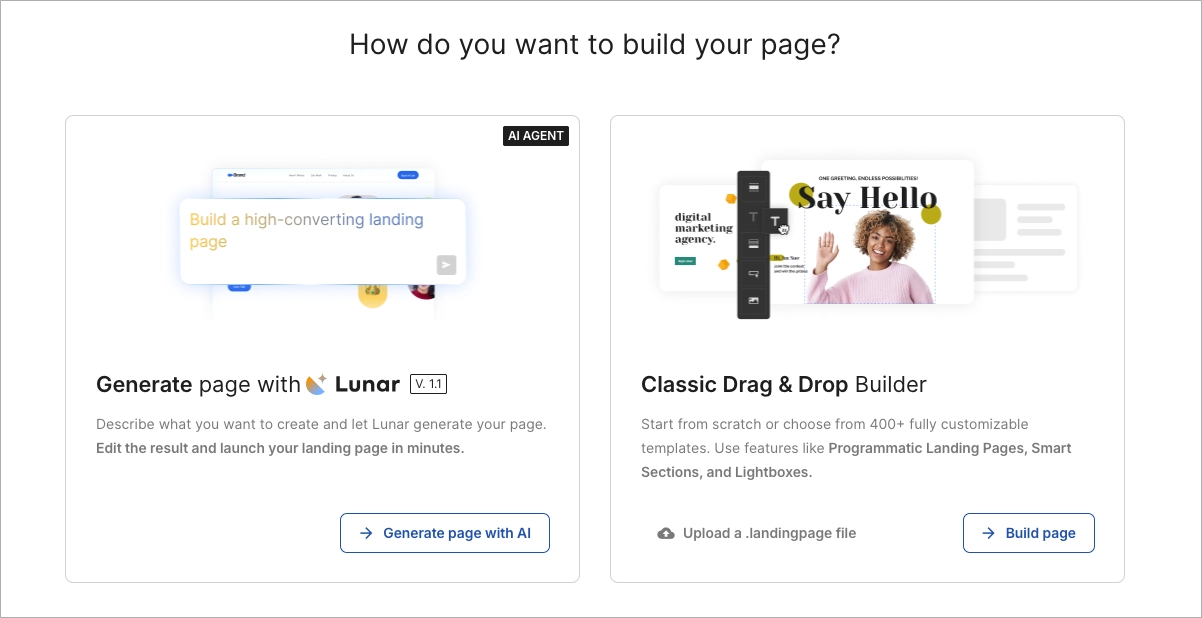
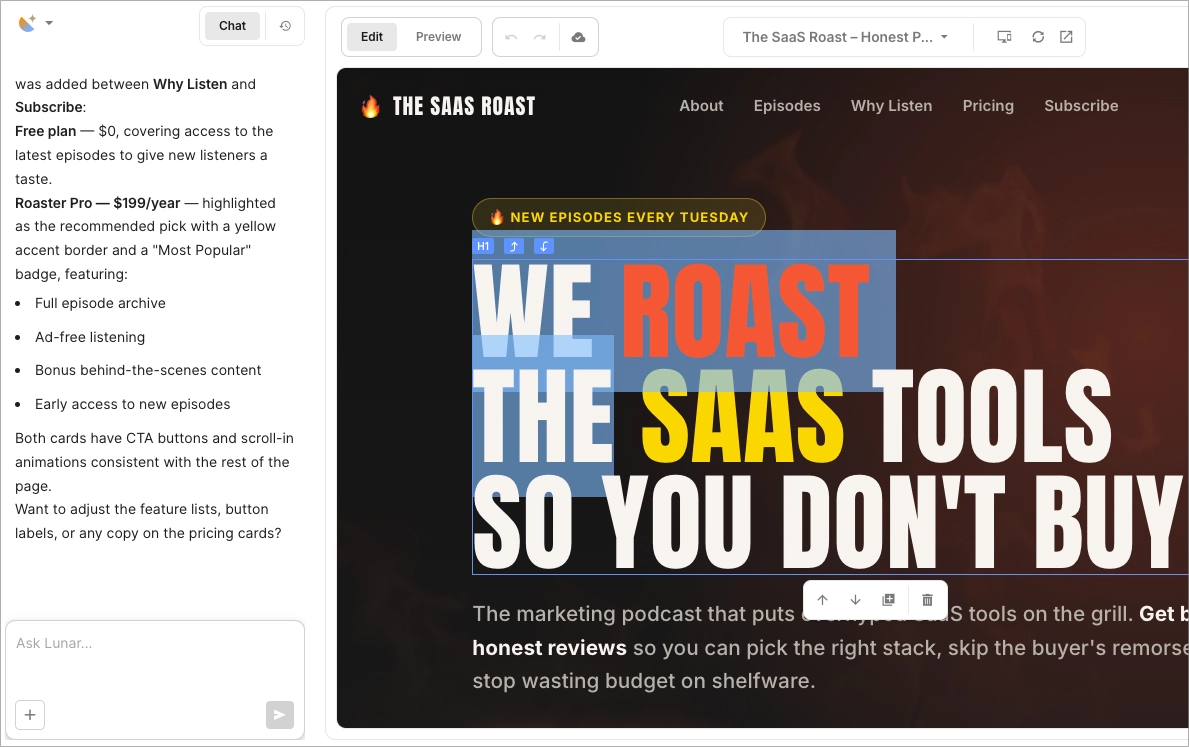
Log into your Landingi account and click Create new landing page. From there, you can choose how you want to build the splash page: use Landingi’s visual drag-and-drop editor or generate a page with Lunar, Landingi’s AI landing page generator. Lunar creates an editable page from your prompt, which you can then refine either manually or by continuing the conversation in its chat interface. If you prefer to control the layout from the start, use the visual editor and build from a blank page or a template.

Step 3: Design a simple and visually clear layout
Whether you start in the visual editor or generate the first version with Lunar, keep the splash page focused on one task. Typically, you’ll need a background (color, image, or video), a short headline, a supporting message, and one main call to action. In the visual editor, you can arrange these elements with drag and drop. If you started with Lunar, you can adjust the generated page manually or ask Lunar through chat to change the copy, layout, or individual sections.

Step 4: Add a call to action (or form)
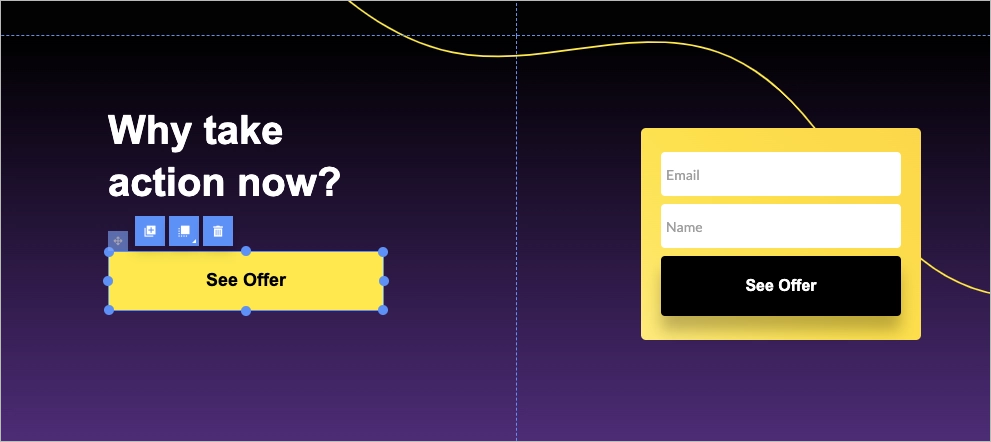
Use the Button widget to create a clear next step – something like “Enter Site,” “Continue,” or “See the Offer.” Make the CTA easy to spot and tap, especially on mobile. If your goal is to collect data, insert a Form widget instead. Landingi allows full control over fields, and integrations with tools like Mailchimp or HubSpot are built-in, making it easy to automatically sync leads into your email lists and trigger follow-up campaigns.
Step 5: Optimize for speed and mobile
Splash pages need to load fast. Use compressed images and avoid heavy scripts. In Landingi, you can switch to Mobile view and fine-tune how your layout appears on smaller screens. Adjust element sizes, reposition buttons, and check that fonts are readable across devices.

Step 6: Make it optional (if needed)
If your splash page isn’t mandatory (for example, if it’s promotional), consider adding a “Skip” or “No Thanks” link. A skip option prevents a promotional splash page from blocking visitors who only want to access the main site. To set this up, just link the button to your main homepage or a dedicated landing page in the same workspace.
Collecting emails before visitors enter the site? Build a focused signup splash page in Landingi.
Step 7: Preview, test, and publish
Before you hit publish, use Landingi’s Preview feature to check how the page looks and behaves on both desktop and mobile. Test the CTA, check the loading time, and make sure the goal of the page is clear at a glance. Once everything looks good, click Publish, and your splash page will be live.

Check publishing options in Landingi to decide whether you want to go live on your own domain, embed the page on WordPress, export it as PHP, or use a reverse proxy setup.
3 Splash Page Best Practices
The 3 splash page best practices involve keeping the layout simple, clarifying the purpose, and using a simple form. Check out how to incorporate these elements and learn from examples how to build your own splash page that keeps the required action clear, whether that action is entering the site, selecting a region, or submitting an email address.
#1 Keep the layout simple
Keep the splash page layout limited to the elements needed for its primary action. A cluttered or overwhelming design can distract visitors and make the required action harder to identify. Instead, focus on creating a clean and uncluttered layout that highlights the most important elements, such as your brand logo, a headline that states the page’s purpose, and a clear call to action.
Start with a minimalist structure. Splash pages’ purpose is to deliver a single message and prompt a quick decision, whether that’s entering the site, signing up, or clicking through.
Make sure your key elements are impossible to miss. The logo should confirm brand identity at a glance, the headline should spark interest immediately, and the call to action should be prominent and easy to act on. Provide spacing between elements to give the page room to breathe, making it easier for users to absorb the content without distraction.
Typography plays a bigger role than you might think. Stick to a clean, readable font that works well across devices. Splash pages often appear before users engage deeply with your brand, so first impressions count – if the text is hard to read, users may bounce before taking any action. Color choice also matters. Use a limited palette that supports your brand and draws attention where it’s needed – usually to the call to action. Too many colors can feel chaotic and reduce clarity.
A simple splash page should make the required action identifiable without visitors having to scan secondary navigation or supporting content, as in the example below:

#2 Clarify the purpose
The purpose is the first thing your splash page should communicate. Visitors should immediately understand why the page exists and what action you want them to take.
That clarity starts with a strong, informative headline that highlights the reason they’re seeing this page – whether it’s to verify age, announce a sale, promote a product launch, or encourage sign-ups.
Your call to action should be just as clear. Make the label describe the next step. “Enter Site,” “Get the Discount,” or “Choose Your Region” is more informative than a generic button such as “Continue.” Avoid ambiguity – confusing language or too many choices can cause visitors to leave before taking any action. Keep secondary choices only when visitors genuinely need an alternative path, such as “Skip” on a promotional splash page.
Clarifying the purpose of your splash page means visitors can identify why the page is blocking access and what they need to do next. Ballantine’s splash page, leveraged for age verification purposes, is clear and straightforward:

#3 Use a simple form
The form on a splash page should be short, clear, and easy to complete – especially if your goal is to generate leads. E-commerce brands often use splash pages to promote limited-time offers or discounts in exchange for basic customer data, such as an email address. But if the form is too long or asks for too much, visitors are likely to leave before submitting anything.
Stick to a name and email address unless you have a strong reason to ask for more. Use clear labels so people immediately know what to type, and make sure the form works just as smoothly on mobile as it does on desktop. A straightforward, well-designed form keeps visitors focused and makes it easier for them to say yes.
A short form reduces the number of decisions visitors need to make before submitting, as in the example below:

What Is the Average Conversion Rate for the Splash Landing Page?
The average conversion rate for splash landing pages can be deduced from the general benchmark for landing pages, which sits at 2.35% across all industries. Some reports, like those from HubSpot, suggest even higher averages – around 5.89%. While exact data for splash pages specifically isn’t widely available, these figures should be treated as general landing page references rather than splash-page-specific targets.
Instead of targeting a generic benchmark, compare the splash page against its own baseline and the conversion action it is designed to produce.
Once your splash page is live, you should track its performance with professional tools like EventTracker or Solis AI from Landingi. Use the interaction data to check where visitors click, whether they complete the intended action, and where they abandon the page before deciding what to test next.
See which splash page elements visitors click and where they drop off with EventTracker.
How Can I Optimize My Splash Page for Higher Conversion Rates?
To optimize your splash page for higher conversion rates, use a minimalist design, craft a clear CTA, ensure fast loading speed, focus on mobile optimization, add social proof elements or trust signals, and, depending on the page’s purpose, use a simple form. Remember to run A/B tests and use analytics to make data-based changes.

Use the checks below to identify friction before testing new splash page variants.
Start with a clean design. A splash page should highlight a single message or action, so avoid unnecessary elements that compete for attention. A simple layout helps site visitors stay focused on what matters.
Your call to action needs to be visually distinct from secondary controls. Use strong contrast, clear language, and keep it visible without requiring visitors to scroll on common screen sizes. Whether you’re asking users to subscribe, claim an offer, or continue to the main site, make the button label describe the result of clicking it.
Speed is non-negotiable. Because a splash page adds a step before the main content, avoid making that step slower with oversized images, video, or unnecessary scripts. Visitors won’t wait – they’ll just leave. On mobile, check that the primary CTA remains visible, form fields fit within the viewport, and visitors do not need to zoom or scroll horizontally.
Trust matters. Add social proof like customer reviews, the number of people who have already signed up, or verified trust badges. These cues help build credibility and reduce hesitation. If you include a form, keep it short. Ask only for the information you truly need. The fewer fields people have to fill out, the more likely they are to finish the process.
Test one meaningful splash page variable at a time. Use A/B testing to compare variations of headlines, images, calls to action, and layouts. For example, test whether changing the incentive, reducing the number of form fields, or replacing a generic CTA affects completion rate. Track how visitors interact with the relevant content, see where they drop off, and look for patterns. Prioritize changes linked to an observed problem, such as form abandonment, low CTA clicks, or a high rate of visitors choosing “Skip.”
What Are the Key Elements of an Effective Splash Page?
The key elements of an effective splash page include an purpose-specific headline, supporting visual where needed, concise copy, and a CTA that states the next step. When combined effectively, these elements create a splash page that makes the page’s purpose and required action clear before visitors enter the main site.
The splash page headline should state its purpose immediately. It should be short, clear, and immediately communicate your offer or purpose. For an age gate, location selector, or promotional pop-up, visitors should understand the task before reading supporting copy.
Visuals should support the splash page’s purpose rather than compete with it. A product image can reinforce a discount offer, while an autoplay background video may be unnecessary on an age-verification or country-selection screen.
The text needs to be just as efficient. Keep the copy brief and specific to the decision on the page. This isn’t the place for long paragraphs – state why the page appears, add only the information needed to make the decision, and name the next step.
That step is usually a call to action, and its label should match the splash page task. Use wording such as “Enter Site,” “Get 15% Off,” or “Select Country” instead of a generic “Continue” when the result can be stated more precisely.
Design should be minimal. A clean layout with lots of white space makes it easier for users to focus on the message and CTA without distractions. If your splash page includes a form, keep it simple. Ask for only the information you truly need – usually just one or two fields. Remove fields that are not needed for the immediate offer or next step; each additional field adds another requirement before submission.
Finally, build trust. Add visual cues like customer testimonials, industry awards, or security badges to reassure visitors that your offer is credible. Use trust signals only when they address a real concern on that splash page, such as data privacy, payment security, or eligibility.
What Is the Best Splash Page Landing Page Builder?
The best splash page landing page builder is Landingi, an AI landing page platform that lets marketers build and publish landing pages, lightboxes, and splash-style pages without coding. It offers a drag-and-drop editor, making it easy to customize your page layout and design. With a variety of landing page templates, you can quickly create splash pages for use cases such as promotions, lead capture, announcements, and pre-launch campaigns.

Landingi also offers advanced AI landing page capabilities that go beyond generating copy, headlines, and visuals. With Lunar, Landingi’s AI-native landing page generator, you can create complete, editable, launch-ready pages from prompts, so the first splash page version can be generated from a prompt and then edited before publishing.
Once your page is live, you can use the A/B testing tool to experiment with different versions and compare variants against the conversion goal you selected. EventTracker lets you monitor user behavior through a transparent dashboard, while Solis AI builds on that data by analyzing landing page context and behavioral signals to deliver insights, alerts, and practical optimization recommendations. Together, Landingi tools help you identify interaction patterns and decide which page elements warrant further testing without relying on external software.
Additionally, Landingi supports integrations with popular marketing tools, including CRM systems, email marketing platforms, and more, making it useful when splash page submissions need to be routed to a CRM or email marketing platform. Its user-friendly interface, flexible design options, marketing integrations, and expanding AI ecosystem make Landingi suitable for building and testing effective splash pages for lead generation, promotions, and campaign entry screens.
Create and Optimize Splash Pages with Landingi
Splash pages can support several distinct tasks before visitors reach the main website. You can use them to make announcements, promote new products or discounts, grab visitors’ contact details, introduce your brand to potential customers, and much more. Whether digital marketers want to collect an email address, confirm eligibility, or route visitors, splash pages work best when the page is limited to one clearly defined task.
That said, consider implementing them into your website – especially with Landingi. Landingi combines the page builder, AI page generator, templates, testing, and optimization tools in one platform. With 400+ templates, a pixel-perfect builder, Lunar for AI page generation, and Solis for AI optimization, you can create a splash page, publish variants, and review visitor behavior without moving the workflow between separate tools.