


UTM parameters can be passed from one URL address to another after clicking the button. This guide will walk you through configuring forwarding UTMs to the target URL, and with this solution, conversions will still be tracked in your landing page Dashboard.
You can set all landing page buttons or a selected button to pass UTMs.

Pass UTMs through all buttons
Set a redirection
1. Go to the editor of your landing page.
2. For every button that is supposed to pass UTMs to another URL address:
- click the button,
- unfold the Click Action tab,
- select the Redirect action,
- enter the target URL (without parameters),
- select the Create a lead after a click option (Open in a new tab is optional).

3. Publish your landing page.
Add a JavaScript code
4. Navigate to your landing page Dashboard.
5. Go to the JavaScript Code tab and add a new script.
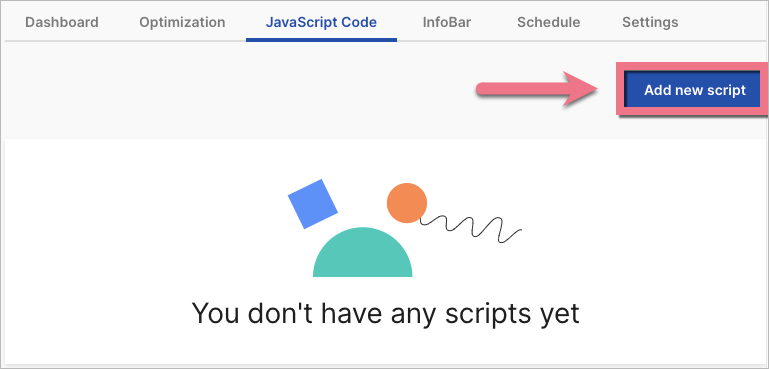
6. Copy the following code:
<script>
$(function(){
  const urlParams = new URLSearchParams(window.location.search);
  $('.widget-button[subtype="redirect"]').each(function( index ) {
    let targetHref = new URL($(this).attr('href'), window.location.origin);
    urlParams.forEach((value, key) => {
        targetHref.searchParams.append(key, value);
    });
    $(this).attr('href',  targetHref.toString());
  });
});
</script>
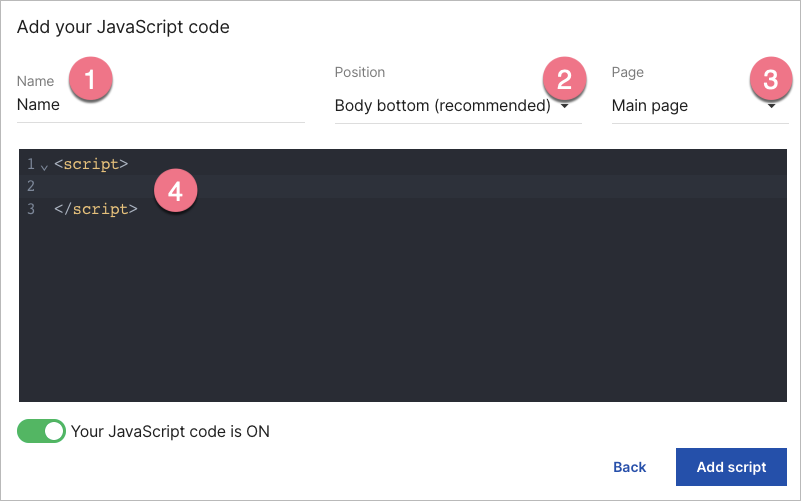
7. Name (1) the script and choose the Body bottom (2) position on the Main page (3). Paste the code in the content field (4).
Save by clicking Add script.
Go to your published landing page and check if the parameters are passed correctly.
Pass UTMs through a selected button
Set a redirection
1. Go to the editor of your landing page.
2. For the button that is supposed to pass UTMs to another URL address:
- click the button,
- unfold the Click Action tab,
- select the Redirect action,
- enter the target URL (without parameters),
- select the Create a lead after a click option (Open in a new tab is optional).
Get the button ID
3. Unfold the Other tab and copy the button ID number.

4. Publish your landing page.
Add a JavaScript code
5. Navigate to the landing page Dashboard.
6. Go to the JavaScript Code tab and add a new script.
7. Copy the following code:
<script>
$(function(){
  let buttonID = '#BUTTON_ID';
  let urlParams = new URLSearchParams(window.location.search);
  let targetHref = new URL($(buttonID).attr('href'), window.location.origin);
  urlParams.forEach((value, key) => {
      targetHref.searchParams.append(key, value);
  });
  $(buttonID).attr('href',  targetHref.toString());
});
</script>
8. Change BUTTON_ID to the number copied from your button.
To add more buttons, repeat the code (without <script> and </script> tags) and change BUTTON_ID to the ID of another button (remember to put # before its number).

9. Name (1) the script and choose the Body bottom (2) position on the Main page (3). Paste the code in the content field (4).
Save by clicking Add script.
Go to your published landing page and check if the parameters are passed correctly. The _session parameter will also be included in the URL address as part of the EventTracker tracking.
Read our blog post to learn more about UTMs, landing pages, and online campaigns.

