


Amazon gives sellers access to shoppers who are already checking prices, reviews, and delivery options inside one marketplace. Amazon PPC lets sellers pay for clicks on sponsored placements in search results, product detail pages, and selected display inventory, so products can appear while shoppers are actively comparing similar offers. The efficiency of Amazon’s PPC is evident – the average PPC Amazon conversion rate is 9.58%, while, to the contrary, the average conversion rate of other e-commerce platforms is ca. 1.35%, according to Ad Badger statistics. The higher average conversion rate suggests that Amazon PPC can perform well when the product listing, pricing, reviews, and fulfillment options match shopper expectations.
Amazon PPC usually needs three layers of control: choosing search terms that match buying intent, setting bids that leave margin after ad spend, and checking whether the listing can convert paid traffic before the budget is scaled. A landing page is most useful when you send external traffic to Amazon (for example, from Google Ads, social ads, influencer campaigns, or email) and need to explain the offer before users click through to the product page. The best PPC marketing tool for landing pages that can help you achieve better results is Landingi – a system for creating and managing PPC landing pages.

What Is PPC in Amazon?
PPC in Amazon is a type of advertising model in which advertisers pay a fee for each ad’s click. Amazon PPC allows sellers to promote their products and brands directly on Amazon’s platform, targeting shoppers actively searching for similar products. Amazon display ads can also appear on different platforms, encouraging external users to check out offers. Amazon PPC targeting options – keyword, product, and audience targeting – help sellers control where ads can appear, but performance still depends on search intent, bid level, listing quality, price, and reviews.
The main benefits of PPC advertising on Amazon include the following:
- Increased visibility – PPC ads help products appear prominently in search results and product pages, increasing their visibility to potential buyers.
- Targeted advertising – by targeting specific keywords and products, sellers can reach shoppers who are more likely to purchase their products, improving conversion rates.
- Measurable results – Amazon PPC reports show impressions, clicks, CPC, spend, sales, and ACoS, so sellers can pause wasteful search terms, raise bids on profitable targets, and move converting queries into manual campaigns.
Create a pre-sell page that explains the product, offer, and coupon before visitors continue to your Amazon listing.
How Does PPC Advertising on Amazon Work?
Amazon’s PPC advertising operates on an advanced auction-based model where advertisers bid for ad placements. Marketers can control their advertising budgets precisely, which enables them to fine-tune bids to achieve the best possible outcomes. Amazon’s advertising platform offers robust analytics and performance tracking, empowering advertisers to closely monitor click-through rate, cost per click, and conversion rates. With CTR, CPC, conversion rate, ACoS, and sales data, advertisers can see whether the problem is low visibility, expensive clicks, or a listing that gets traffic but does not convert.
Amazon PPC advertising involves the following steps:
- Ad creation and targeting – you design ads and set specific targeting parameters to reach your desired audience. Targeting options include keywords, product categories, and even competitor products, ensuring that ads are shown to shoppers most likely interested in specific products.
- Bidding and budgeting – you can set a maximum cost-per-click (CPC) bid for each keyword or product target. You can also establish a daily or monthly budget for each campaign to control overall spending.
- Ad auction and placement – Amazon determines ad placement based on factors such as bid amount, ad relevance, expected click-through rate, product availability, and the likelihood that the ad will lead to a sale.
- Click and conversion tracking – the platform provides detailed analytics on how many times an ad was clicked and what actions shoppers took afterward, such as making a purchase. Implementing conversion tracking helps calculate ROI and identify areas for improvement.
6 Amazon PPC Best Practices That Control Spend and Sales
The six Amazon PPC practices below focus on the decisions that usually affect spend first: keyword selection, listing readiness, ad format choice, campaign automation, product targeting, and seasonal budget changes.
Use a landing page to repeat the ad promise, explain the offer, and send users to the right Amazon listing.
#1 Choose keywords by buying intent, not only search volume
The first Amazon PPC best practice is to focus on keywords. Choose key phrases that describe the product, match buying intent, and leave enough margin after CPC – for example, a phrase like “noise canceling headphones for flights” is usually more specific than “headphones.” Focus on long-tail keywords specific to your products, as they often have less competition and higher conversion rates. Add negative keywords to stop ads from appearing for irrelevant searches and reduce spend on clicks that are unlikely to lead to orders. Regularly review your search term reports to identify and add new negative keywords.
#2 Prepare product listings before you pay for clicks
The second Amazon PPC best practice is to optimize product listings before running PPC campaigns. Before you pay for clicks, check whether the listing can convert: main image, title, price, reviews, delivery promise, bullet points, and stock availability should match what the ad promises.
Use high-resolution, professional images that clearly show your product from multiple angles. Follow Amazon’s image guidelines, which typically include having a pure white background, showing the product occupying at least 85% of the frame, and avoiding additional text or graphics in the main image. In addition to standard product images, include lifestyle images that show the product in use.
Write detailed product descriptions that accurately convey the product’s features and benefits. In the product description, make the buying decision easier: state compatibility, dimensions, material, use cases, package contents, and any limitations that could prevent returns or negative reviews. Focus on how the product can solve a problem or improve the customer’s life. Incorporate keywords naturally within the description to enhance search visibility without keyword stuffing.
#3 Match each Amazon ad format with a specific campaign goal
The third Amazon PPC best practice is experimenting with different ad formats. Use Sponsored Products when you want to push individual listings, Sponsored Brands when you need search-result visibility for a product line, and Sponsored Display when you want to retarget shoppers or appear on related product pages.
You can also test various bidding strategies, such as dynamic and fixed bids, to determine what works best for your goals. A/B testing can help you determine which ad elements work best, including ad copies, images, and headlines. Use test results to make one decision at a time: keep the format that brings sales at an acceptable ACoS, pause variants with clicks but no orders, and test new creatives only after the targeting is clean.
Create a page that answers product questions before users click through to your Amazon Store.
#4 Use automated campaigns for keyword discovery
The fourth Amazon PPC best practice is to use Amazon’s automated campaigns to complement your manual campaigns. Automatic campaigns are useful for keyword discovery, but they should be reviewed through the search term report. Move converting queries into manual campaigns, add irrelevant queries as negatives, and limit the budget until the campaign proves it can generate orders at an acceptable ACoS.
#5 Use product targeting to compete on specific ASINs
The fifth Amazon PPC best practice is to focus on product targeting. Use product targeting to appear on detail pages of direct competitors, cheaper alternatives, premium alternatives, complementary products, or products with weaker ratings than yours. Product targeting helps you reach shoppers who are already comparing similar or complementary ASINs, which can work well when your product has a stronger price, rating, bundle, or delivery offer.
Product targeting isn’t limited to direct competitors. You can also target products that complement yours. For instance, if you sell phone cases, you could target ads on smartphone product pages. This cross-selling approach helps you tap into an audience interested in related items, increasing the potential for additional sales.
#6 Adjust bids, budgets, and inventory checks for seasonal peaks
The sixth Amazon PPC best practice is to optimize ads for seasonality. Before seasonal peaks, update budgets, bids, negative keywords, inventory checks, coupon visibility, product images, and delivery promises so ads do not send paid traffic to listings that cannot fulfill demand. For instance, increase your ad spend and bid amounts during peak shopping seasons, such as holidays, Black Friday, or Prime Day, to capitalize on increased traffic and sales potential.
How to Start a PPC Campaign on Amazon?
To start a PPC campaign on Amazon, you must set up an Amazon Seller account, choose the campaign type, and set your campaign parameters and targeting type. Then, you should conduct keyword research, set bids, and create an ad campaign. After launch, review search terms, CPC, sales, ACoS, and budget use regularly, because early clicks often reveal whether the problem is targeting, bid level, or listing quality.
Check out a detailed 8-step guide below to launch your Amazon PPC campaign:
1. Set up an Amazon Seller account
Before you can run PPC ads, you need an active Amazon Seller account. If you haven’t already, sign up for an Amazon Seller Central account and complete the necessary registration and verification processes. Once your account is set up, log in to your Seller Central account and navigate to the Amazon Advertising Console. This is where you will manage all your advertising campaigns.
2. Choose your campaign type
The second step in creating an Amazon PPC campaign is to choose its type. Select one that aligns with your goals and will allow you to reach your target audience. Amazon offers 3 main ad formats, as follows:
- Sponsored products – this ad format is designed to promote individual product listings. Sponsored Products work best for individual listings with competitive pricing, clear images, enough reviews, and stock availability, because the ad usually sends shoppers straight into a product comparison environment.
- Sponsored brands – it’s another Amazon ad format, the best choice to increase brand awareness. These ads feature a brand logo, a custom headline, and multiple products, building recognition and trust among shoppers. They appear at the top of Amazon search results.
- Sponsored display – this type of ad targets audiences both on and off Amazon with display ads, so they can extend your advertising reach beyond Amazon. These ads appear on product detail pages, customer review pages, and third-party websites. Retargeting capabilities of Amazon display ads can re-engage shoppers who have shown interest in your products, improving conversion rates.
3. Create a new campaign and set its parameters
A third basic step in starting a new campaign on Amazon is ad creation. In this process phase, you select the type of campaign you want to create (e.g., Sponsored Products). To set up your campaign, you must fill in the required fields:
- Campaign name – choose a descriptive name to help you easily identify the campaign later.
- Start and end dates – set the duration of your campaign or choose to run it continuously.
- Daily budget – determine how much you will spend per day on this campaign.
4. Select your targeting type
The fourth phase is selecting targeting type between manual targeting and automatic targeting. The first type allows you to select specific keywords or products to target, giving you more control. It’s a great option for more experienced advertisers. Automatic targeting is useful for new advertisers or those looking to discover new keywords – Amazon uses its algorithms to match your ads to relevant search terms and products automatically.
5. Set bids for keywords or products
The fifth step in starting an Amazon PPC campaign is setting bids for chosen keywords or products. Determine how much you are willing to pay for each click on your ad and set a maximum bid for each keyword (in case of a manual targeting strategy) or if you’re targeting specific products, set your bids accordingly.
6. Create your ad
The sixth step, ad creation, is the most creative part of PPC advertising on Amazon. It requires various approaches, depending on the ad format. For sponsored products, you simply select the products you want to advertise. For Sponsored Brands, use a brand logo, a headline that names the product category or offer, and an image that shows the product line or use case without making shoppers guess what is being sold. If you want to create a video ad, use a short-format product video showcasing its benefits and real-life usage cases to engage users with your offer.
Create a landing page that explains the product, offer, and next step before sending visitors to Amazon.
7. Launch your campaign
The seventh step is launching your campaign, but before launch, check campaign type, targeting mode, daily budget, bids, start date, advertised ASINs, landing destination, coupon visibility, stock status, and whether the listing matches the ad promise. Check twice headlines, copy, prices, and visuals.
8. Monitor and optimize
The eighth step is monitoring and optimizing your campaign after launching. Regularly check its performance using the Amazon Advertising Console. Pay attention to key metrics such as impressions, clicks, click-through rate (CTR), cost-per-click (CPC), and conversions. Then, you can use this data to increase bids on high-performing keywords or lower bids on underperforming ones and refine targeting by adding negative keywords. You should continuously test and improve your ad content to increase engagement and conversions.
What Is the Cost of a PPC Amazon Campaign?
The cost of a PPC Amazon campaign can range from about $0.20 to $6.00, with many advertisers paying around $0.81–$2.00, but the actual cost depends on category competition, placement, keyword intent, bid strategy, and how attractive the offer is compared with nearby listings.
- Bidding strategy – in manual bidding you set your own bids for keywords or product placements, which can give you more control but requires constant monitoring and adjustments. In automatic bidding, Amazon optimizes bids to achieve the best possible outcomes within your total budget, often leading to varying costs based on competition.
- Keywords and competition – popular and high-demand keywords tend to have higher costs per click (CPC) due to increased competition. Niche keywords may be less expensive but might have lower search volumes.
- Product categories – different product categories can have different levels of competition. For example, electronics and beauty products might have higher CPCs compared to niche or less competitive categories.
- Ad placement – ads placed in high-visibility areas, such as the top of search results or product pages, generally cost more due to their prime positioning.
- Targeting options – broader targeting can increase reach but might lead to higher costs. More precise targeting, such as by specific demographics or shopper behaviors, can be more cost-effective but might limit the audience size.
Use a pre-sell page to qualify external traffic before users continue to your Amazon listing.
4 Examples of PPC Amazon Advertising
The examples below show where each Amazon ad format appears, what the shopper sees before clicking, and which campaign goal the format usually supports.
1. Video product ads
The first example is an Amazon video product ad leveraged by Bose. They use a sponsored product ad campaign to present their product offer – Bose’s headphones. The video quickly shows the headphones in use and connects the product benefit with a specific situation, such as listening, commuting, or working without background noise.
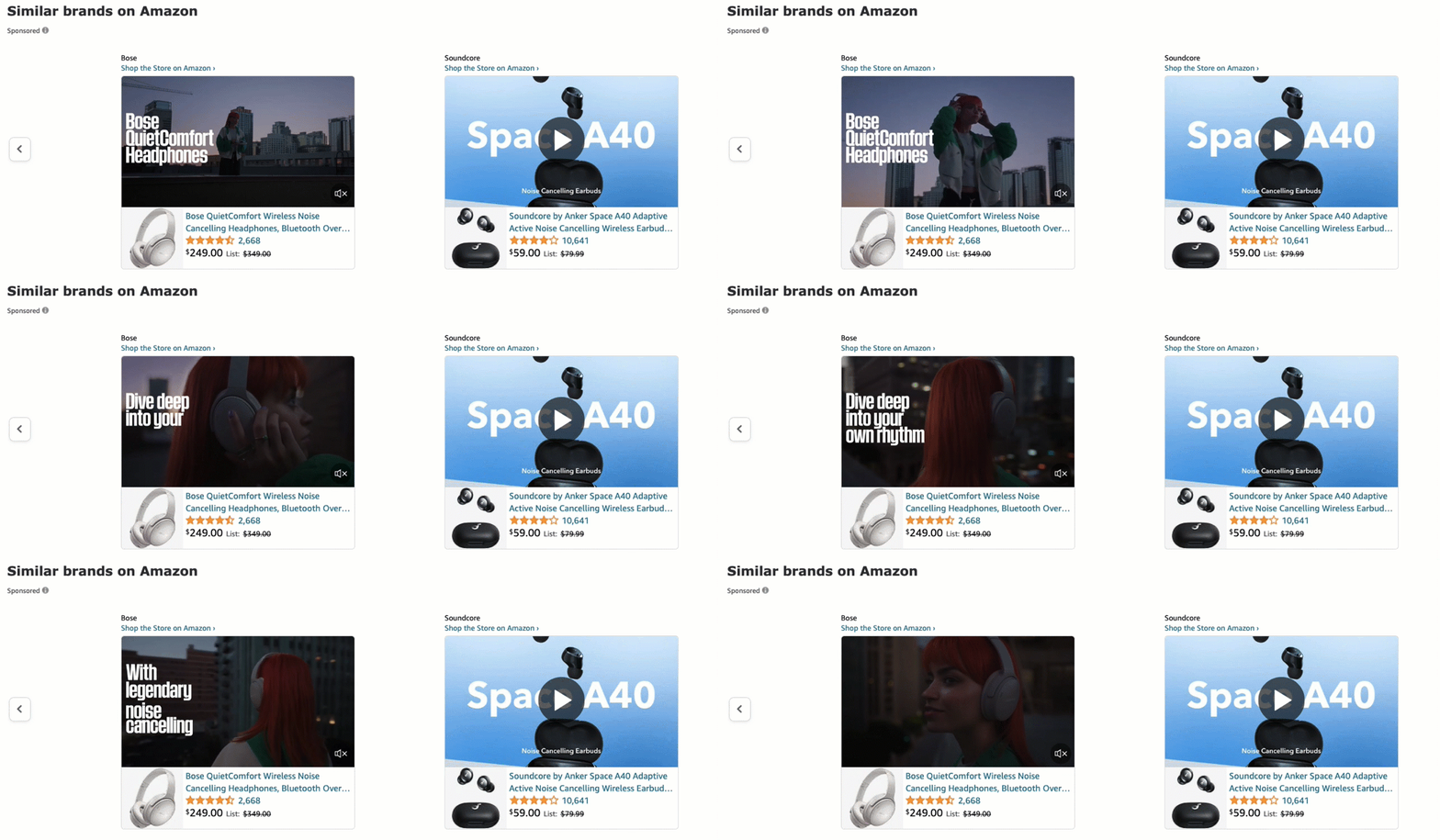
The Bose ad that relies on video content also includes product ratings, price with a special discount offer, and a link to the auction. In addition, users can click CTA, directing them to the brand’s Amazon store. This type of ad appears when Amazon shoppers search for similar products, catching their attention immediately and encouraging them to check out the auction.
Video ads in Amazon search results can work well when the product benefit is easier to understand visually than through a title or thumbnail alone.
2. Related product ads
The second example illustrates a sponsored products campaign, including a list of offers related to an auction currently being viewed by users. The product list includes a few different ads, each with a high-quality thumbnail image showcasing the offered product, ratings, price, and a short product description linked to an auction. Some of these ads include special offers encouraging users to purchase.

Related product ads on Amazon product detail pages can reach shoppers who are already comparing one item and may still be open to a similar, cheaper, better-rated, or complementary product. Amazon sellers use these ads to increase product visibility, drive more traffic to their listings, and ultimately boost sales by reaching buyers ready to purchase.
3. Display product ads
The third example of an Amazon PPC campaign is a display product ad on the right sidebar of a specific item auction. This type of Amazon ad is designed to catch the eye of shoppers browsing product details, providing an additional opportunity to showcase your product to potential buyers. By appearing in the sidebar, these ads benefit from high visibility and can effectively draw attention away from competitors’ listings.

Display ads on Amazon usually include a product picture, its short description, ratings, and price, often with highlighted special discounts. Amazon display product ads can use browsing and purchase signals to reach shoppers who viewed related products, abandoned comparison paths, or may respond to a reminder outside the search results.
4. Brand ads
The fourth example of an Amazon PPC campaign showcases brand ads appearing in search results. Sponsored Brand ads appear for relevant search queries and combine a brand logo, headline, and selected products, so sellers can promote a product line rather than only one listing. Each brand ad includes a high-quality picture, brand logo, and CTA with proper messaging, encouraging users to discover a particular brand’s Amazon store.

Sponsored brand ads are used by Amazon sellers to boost their brand awareness. Their high-visibility placement captures shoppers’ attention right at the start of their search journey, increasing the chances of clicks and engagement. Sponsored brand ads help drive traffic to your product listings and direct customers to a customized Amazon store or a dedicated landing page.
Sending Sponsored Brand clicks to an Amazon Store or a dedicated product page can keep the shopper inside one branded path: search result, offer overview, product comparison, and purchase option.
Build a pre-sell page that explains the product, coupon, or bundle before visitors continue to your Amazon listing.
Can PPC Be Used on Amazon?
Yes. Amazon supports PPC advertising through formats such as Sponsored Products, Sponsored Brands, and Sponsored Display, where sellers pay when shoppers click their ads. Advertisers bid on relevant keywords, ensuring their ads appear in search results and on product detail pages. The cost-per-click model means advertisers only pay when a shopper clicks on their ad, offering a cost-efficient strategy to reach potential customers. Continuous monitoring and optimization are crucial to maximizing campaign success.
What Distinguishes PPC in Amazon?
PPC in Amazon refers to pay-per-click advertising, a strategic model enabling sellers to elevate their products and brand visibility directly on Amazon but with specific ad formats, like display ads, also on external platforms. What makes Amazon PPC different is the purchase context: ads appear while shoppers are searching, comparing products, reading reviews, checking prices, and deciding whether to buy.
A performance-based model requires advertisers to bid on relevant keywords, with costs incurred only when a potential customer clicks on the ad. Optimizing these Amazon campaigns through continuous monitoring ensures maximum ROI and competitive advantage.
What Is the Difference Between Amazon Ads and PPC?
Amazon ads encompass a range of advertising options available on Amazon’s platform, including various formats such as display ads or video ads, and more, designed to enhance brand visibility and drive sales. PPC (pay-per-click) is a specific type of advertising model used within Amazon ads where advertisers pay a fee for each ad click. While all Amazon PPC ads are part of Amazon ads, not all Amazon ads operate on a PPC model. Other models, such as CPM (cost-per-thousand-impressions), are also used in Amazon’s broader advertising ecosystem.
Which Is Better: PPC or Amazon Ads?
For e-commerce companies operating on Amazon, Amazon ads are typically better than general PPC campaigns because they allow for direct promotion within the world’s largest online marketplace. The comparison is not exact: PPC is a payment model, while Amazon Ads is Amazon’s advertising ecosystem. For sellers focused on Amazon sales, Amazon Ads is usually the more direct channel because Sponsored Products, Sponsored Brands, and Sponsored Display can appear inside the marketplace where shoppers can buy immediately.
What Is the Best PPC Amazon Tool for Landing Pages?
The best PPC Amazon tool for landing pages is Landingi, an AI landing page operation system for creating high–converting landing pages, that can be an ideal campaign hub that seamlessly connects various advertising channels, such as social media ads, with Amazon product pages. Landingi allows users to build focused landing pages that present a single product and its special offers effectively.
Engage traffic with personalized landing pages and direct them to your Amazon store.
Landingi provides tools for creating engaging, objective-driven landing pages that direct traffic to your Amazon auctions. These pages can provide detailed product information and highlight special offers before users reach Amazon, enhancing the likelihood of conversions.
Landingi’s intuitive drag-and-drop editor requires no coding skills, enabling users to design professional, responsive landing pages. With over 400 customizable templates, users can start from layouts built for product offers, lead capture, webinar signups, app promotion, event pages, or ecommerce campaigns instead of designing each page from scratch. Landingi offers AI page generation to make the landing page creation even faster and more effective. The platform provides automatic translation into 35 languages and supports RTL landing pages, which can help teams adapt Amazon-related campaigns for international audiences. All landing pages created with Landingi are mobile-friendly, so the pre-sell step works consistently before users continue to Amazon.
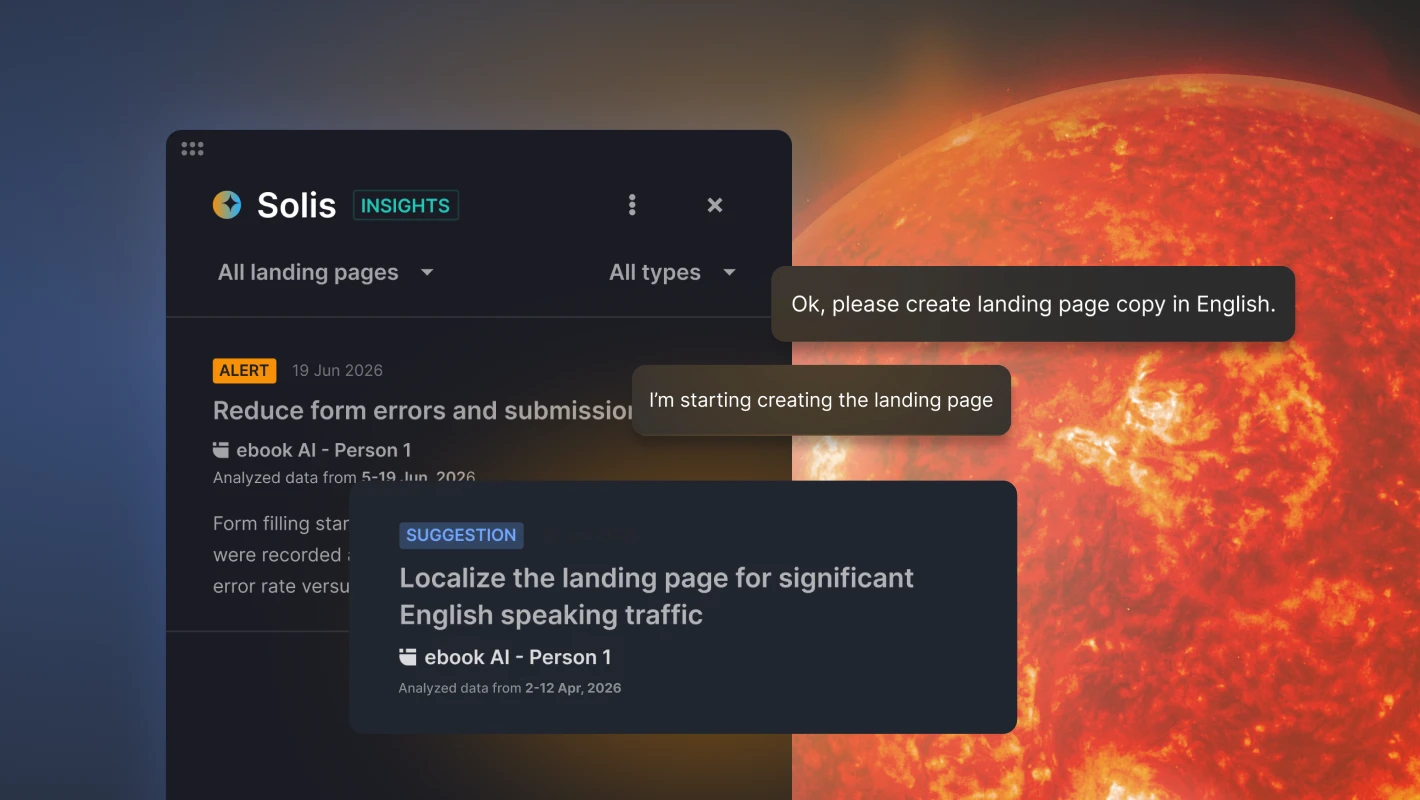
Landingi also offers A/B testing, allowing users to compare page variants without external tools. This feature helps make data-driven decisions to optimize user interaction and improve conversion rates. A built-in EventTracker can show micro-conversions such as button clicks, form starts, scroll depth, and element interactions, so marketers can see where users hesitate before clicking through to Amazon or submitting a form.
Landingi integrates with marketing tools used for ads, analytics, email, and CRM workflows, so teams can connect the pre-sell page with the channels that send traffic to Amazon.
Use Landingi When Amazon PPC Needs a Pre-Sell Page
Amazon PPC is useful when sellers know what they want to control: search visibility, product-page placement, brand exposure, retargeting, or external traffic that needs a pre-sell page before Amazon.
Setting clear goals, gaining deep insights into your target market, and creating engaging and relevant ad content are crucial to successful Amazon advertising. The examples highlighted in this article showcase the significant impact of precise audience targeting, creative ad content, and strategic promotions in increasing user engagement and driving sales. However, a way to achieve even higher ROI than your competitors is to leverage PPC landing pages to drive traffic to your Amazon auctions.
Running external traffic to Amazon? Use Landingi to build a pre-sell page that repeats the ad promise, explains the offer, and sends visitors to the right Amazon listing only after they understand what they are about to buy.






