


Google PPC advertising allows businesses to gain instant visibility by paying for clicks instead of waiting for organic traffic. With billions of daily searches, Google pay-per-click advertising through Google Ads (formerly Google AdWords) gives brands direct access to high-intent users and measurable ROI.
However, launching a campaign is not enough. Profitable Google PPC advertising requires structured keyword research, smart bidding, precise targeting, and optimized landing pages. Google evaluates ad and page quality using signals such as relevance, speed, and user experience — similar factors that influence SEO performance.
Instead of building campaign pages inside a traditional CMS, tools like Landingi let you create dedicated PPC landing pages designed for conversions. You can even build a single subpage optimized for both SEO and paid traffic, since both channels rely on quality and relevance signals. With built-in A/B testing and seamless Google Ads integration, platforms like Landingi make scaling paid campaigns faster and more data-driven.
Before launching your campaign, follow the structured best practices below to ensure your budget turns into measurable business results.

What Is PPC in Google?
PPC in Google is a digital advertising model where advertisers pay each time someone clicks on their ad. The model operates through Google Ads, a platform that allows businesses to display ads on Google search results pages (SERPs) and across the Google Display Network. Payment is triggered by user interaction, not by ad visibility alone.
Google Ads supports multiple formats, including search ads, shopping ads, display ads, and video ads. Each format serves a different goal, such as driving direct sales, generating leads, or building brand awareness. Choosing the right format directly affects campaign performance and return on investment.
The main advantage of Google PPC is immediate visibility. Ads appear when users actively search for related products or services, which captures high-intent traffic. Because performance metrics such as clicks, cost per click (CPC), and conversions are measurable in real time, advertisers can optimize campaigns based on data rather than assumptions.
Maximize your Google PPC results! Build perfect landing pages for your ads with Landingi today.
Why Should I Use Google PPC Advertising?
You should use Google PPC advertising because it delivers immediate, targeted, and measurable results. Campaigns can launch within hours, and ads can appear at the top of search results almost instantly. This speed makes Google PPC effective for product launches, seasonal promotions, and time-sensitive offers.
Google Ads allows precise audience targeting based on keywords, location, demographics, device type, and user behavior. Targeting high-intent search queries increases the likelihood of clicks and conversions. Better relevance also improves Quality Score, which can reduce cost per click (CPC).
Google PPC provides full budget control and transparent performance tracking. Advertisers set daily or monthly limits and pay only when users click. Real-time metrics such as impressions, CTR, conversions, and ROI enable data-driven optimization without guesswork.
Google PPC also strengthens brand visibility and competitive positioning. Ads appear above organic results, increasing exposure even without clicks. Features such as remarketing, ad extensions, and multi-format campaigns (search, display, shopping, video) allow businesses to reach users across different stages of the buying journey and integrate PPC with SEO, content, and social media strategies.
How Does PPC Advertising in Google Work?
Google PPC advertising operates on an auction-based system. Advertisers bid on keywords, and Google determines ad placement using Ad Rank, which is calculated from the bid amount and Quality Score. Quality Score reflects ad relevance, expected click-through rate (CTR), and landing page experience.
When a user enters a search query, Google runs a real-time auction to decide which ads appear and in what order. Ads can display on search engine results pages or across the Google Display Network. Higher Ad Rank improves position and can lower actual cost per click (CPC).
Google Ads provides full control over budgets, bidding strategies, and targeting settings. Advertisers can track metrics such as impressions, CTR, CPC, and conversion rate in real time. Continuous data analysis allows performance optimization and better return on ad spend (ROAS).
Google PPC campaigns follow a structured process:
- Keyword research and selection – Identify relevant search terms using tools such as Google Keyword Planner. Focus on intent-driven keywords with balanced competition.
- Ad creation – Write clear headlines, persuasive descriptions, and strong calls to action aligned with selected keywords.
- Budget and bidding setup – Set daily or total budgets and choose manual or automated bidding based on campaign goals.
- Audience targeting – Refine targeting by demographics, location, device, and remarketing lists to reach qualified users.
- Ad extensions – Add sitelinks, call extensions, or location details to improve visibility and CTR.
- Landing page optimization – Ensure message consistency, fast loading speed, and a clear conversion path. Tools like Landingi simplify PPC landing page creation and testing.
- Campaign monitoring and optimization – Analyze performance data and adjust bids, keywords, and creatives to improve efficiency and ROI.
Effective PPC management requires continuous testing and refinement. Structured optimization increases conversion rates while controlling advertising costs.
Optimize your Google PPC strategy – craft relevant pages that deliver higher conversions and better ROI.
How to Start a PPC Campaign on Google?
To start a Google PPC campaign, you must access a Google Ads account and prepare your campaign based on the goals and target audiences you want to reach. Ad creation should start with researching keywords, preparing ad creatives, and optimizing landing pages. Once you’ve done this, you can choose the campaign type, set the budget and bidding strategy, define your target audience, and use ad extensions. The rest is launching and monitoring ad performance for further optimization.
Check out the detailed 9-step guide below and use it as your checklist while launching a new PPC Google campaign:
1. Set up your Google Ads account
Before creating any campaign, you must correctly configure your Google Ads account. Go to ads.google.com, click “Start now,” and sign in with your Google account. For business use, create or use a dedicated company email to maintain structured access and permissions.
During setup, switch to Expert Mode to unlock full control over targeting, bidding, and campaign structure. Avoid Smart Campaign mode if you want scalability and advanced optimization options.
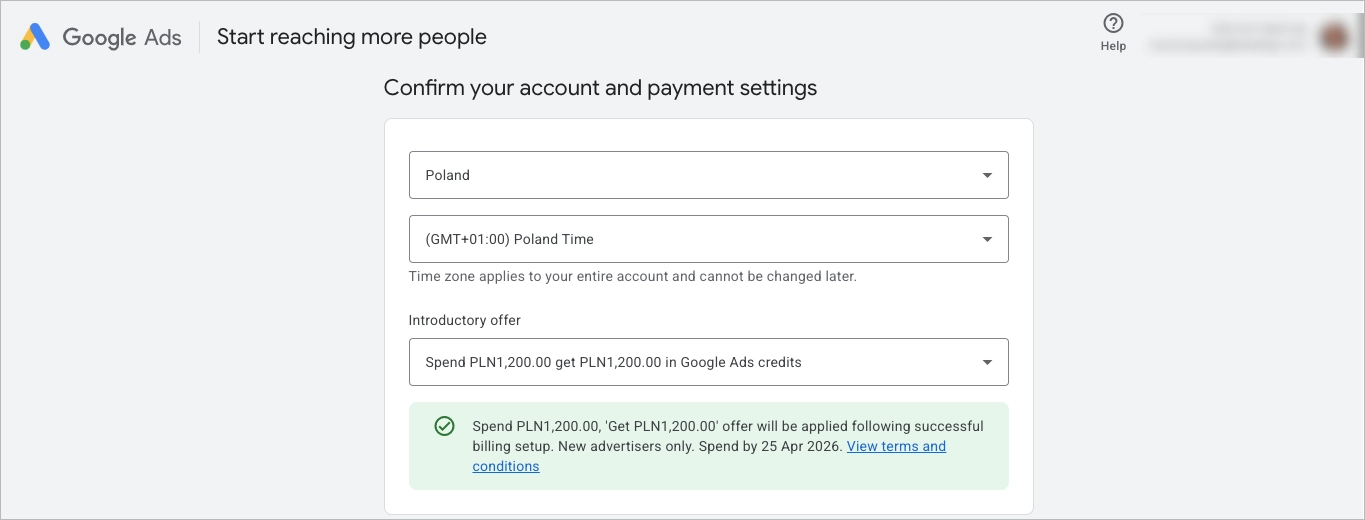
Complete the required administrative setup:
- Add your business name and website URL
- Configure billing country, currency, and time zone
- Add your payment method
These settings affect reporting accuracy and cannot be changed later, so review them carefully.
You should also enable basic conversion measurement at this stage. Connecting Google Analytics or Google Tag Manager ensures that future campaigns can track meaningful actions such as purchases or form submissions.
This step is technical, not strategic. The goal here is to prepare a clean, fully functional account before making advertising decisions.
2. Define your campaign goals
Now define what success means for your campaign. Do not treat goal selection as a button to click inside the interface — treat it as a business decision. Your objective determines campaign type, bidding strategy, and optimization logic.
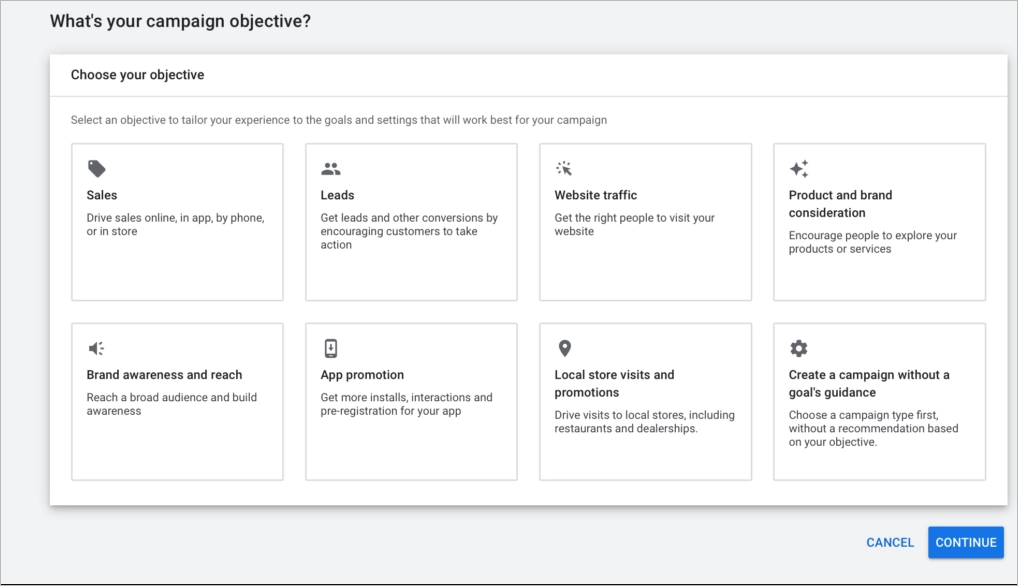
Common campaign goals include:
- Sales
- Lead generation
- Website traffic
- Brand awareness
Each goal activates different automation and bidding recommendations. Choosing “Sales” triggers conversion-focused optimization, while “Traffic” prioritizes clicks rather than revenue.
Next, define your Key Performance Indicators (KPIs). KPIs translate your goal into measurable metrics. For example:
- Sales → ROAS, conversion rate, CPA
- Leads → cost per lead, form completion rate
- Traffic → CPC, CTR
Clear KPIs prevent misinterpretation of performance data. Without defined benchmarks, you cannot evaluate whether a campaign is profitable or simply generating clicks.
Step 1 prepares the account.
Step 2 defines the strategy.
Only after both are complete should you move to keyword research and campaign creation.
3. Conduct PPC keyword research
Keyword research determines who sees your ads and how much you pay for each click. Inside Google Ads, open Keyword Planner and analyze search volume, competition level, and estimated cost per click (CPC). Focus on keywords that directly match your offer and signal clear user intent.
Separate keywords by intent. High-intent terms such as “buy CRM software” or “book online English course” typically convert better than broad phrases like “CRM tools” or “learn English.” Long-tail keywords are often less competitive and more conversion-focused, which improves return on ad spend (ROAS).
Create a structured keyword list grouped by theme. Each ad group should contain closely related keywords to improve ad relevance and Quality Score. Tight keyword grouping increases click-through rate (CTR) and lowers cost per click over time.
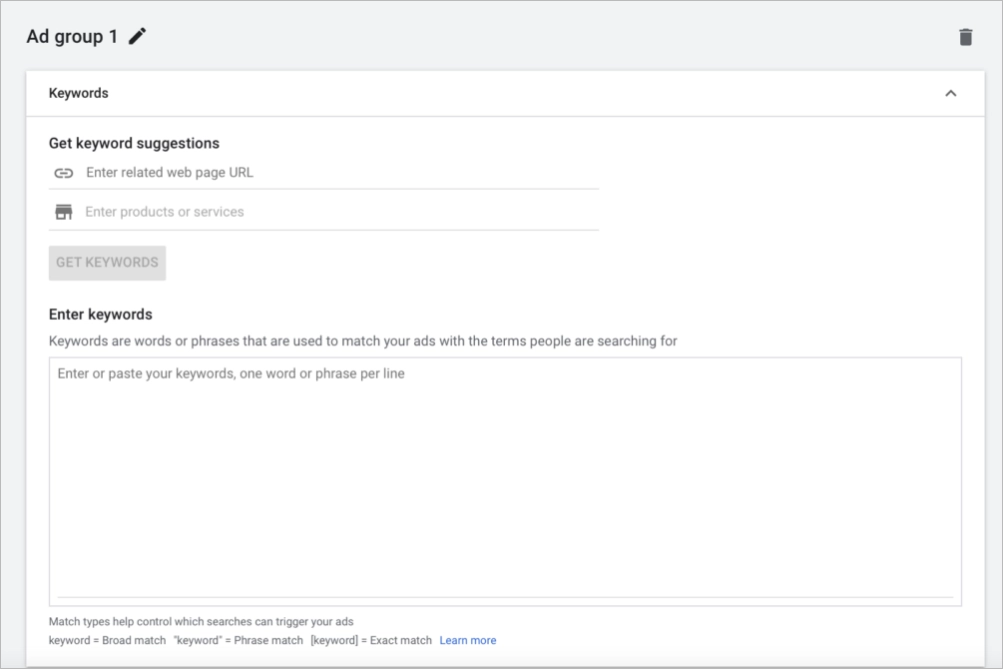
Negative keywords are equally important. Add terms that indicate low purchase intent or irrelevant searches to prevent wasted budget. Regularly updating your negative keyword list improves targeting precision and protects overall campaign ROI.
Keyword research is not a one-time task. Review search term reports after launch to refine targeting, expand profitable terms, and eliminate underperforming queries.
4. Create your campaign
Before creating campaigns, define your account structure. Decide how you will segment campaigns at the account level — by goal, location, product category, brand vs non-brand keywords, or funnel stage. A clear structure improves budget control, reporting clarity, and long-term scalability.
After defining keywords and goals, create your campaign inside Google Ads. Click “New Campaign” and select the campaign type that matches your objective: Search, Display, Shopping, Video, or App. Each type determines where your ads appear and how users interact with them.
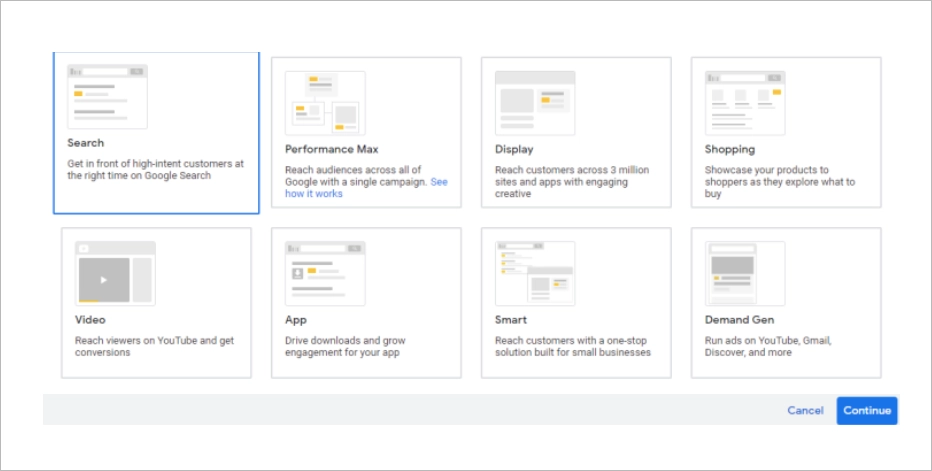
Choose your campaign type based on intent and funnel stage.
- Search targets high-intent users actively looking for solutions.
- Display builds awareness across partner websites.
- Shopping promotes specific e-commerce products.
- Video increases engagement on YouTube and partner platforms.
Next, name your campaign clearly. Use a structured naming convention that includes goal, network, and date (e.g., Search_Leads_US_Q1). Clear naming improves reporting, scaling, and account management as campaigns grow.
Then choose where your ads will appear. For Search campaigns, decide whether to include the Google Search Network, Search Partners, or both. Avoid enabling unnecessary networks in early stages to maintain targeting control and cleaner data.
Campaign type selection determines traffic quality, bidding strategy, and optimization logic. Choosing the correct format ensures alignment between user intent, budget allocation, and expected results.
5. Set your budget and bidding strategy
Your budget and bidding strategy determine how aggressively your campaign competes in the auction. Set a daily budget that aligns with your overall marketing allocation and acceptable risk level. Start with a controlled amount, then scale based on performance data.
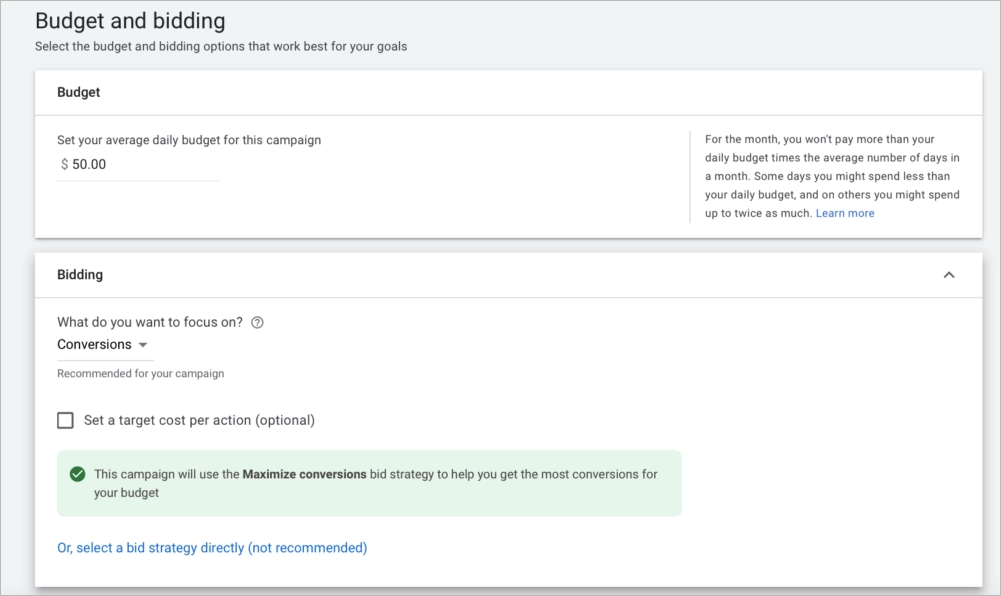
Next, choose a bidding strategy based on your campaign goal. Google Ads offers several automated and semi-automated options:
- Target CPA (Cost per Action) – Optimizes for conversions while aiming to maintain a specific cost per acquisition.
- Target ROAS (Return on Ad Spend) – Focuses on maximizing revenue while achieving a defined return percentage.
- Maximize Conversions – Uses your full budget to generate as many conversions as possible without a fixed CPA target.
- Maximize Conversion Value – Prioritizes total conversion value rather than volume.
- Enhanced CPC (ECPC) – Adjusts manual bids automatically to increase conversion probability.
Each strategy uses historical data and real-time signals differently. For new accounts with limited conversion data, “Maximize Conversions” is often a practical starting point. For mature accounts with stable performance, Target CPA or Target ROAS provides stronger cost control.
Budget and bidding directly influence visibility, cost per click (CPC), and return on investment. Choosing the correct strategy ensures your campaign optimizes toward business outcomes rather than just traffic volume.
6. Define your target audience
Audience targeting determines who sees your ads and how efficiently your budget is spent. Inside Google Ads, refine your targeting by location, demographics, devices, and audience segments. Precise targeting reduces wasted clicks and improves conversion rates.
Start with geographic targeting. Select countries, regions, cities, or radius-based locations that match your service area. If you operate locally, limit targeting to relevant regions to prevent paying for irrelevant traffic.
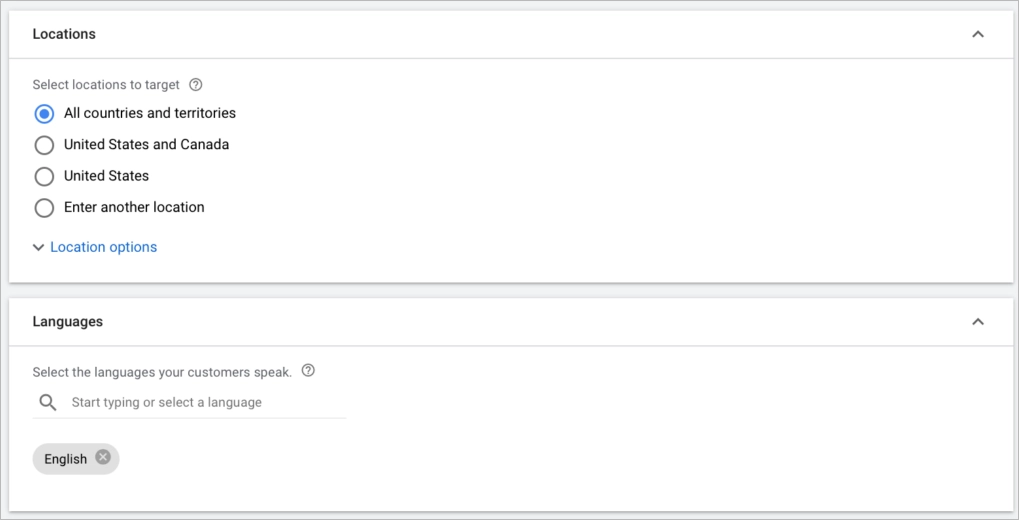
Next, define demographic filters such as age, gender, household income (where available), and parental status. Excluding low-performing segments improves cost efficiency and increases return on ad spend.
You can also adjust bids by device type (desktop, mobile, tablet). If performance data shows higher conversions on mobile, increase mobile bid adjustments to prioritize high-performing traffic.
Use audience segments to refine targeting further. These include in-market audiences, affinity audiences, custom intent audiences, and remarketing lists. Remarketing allows you to re-engage users who previously visited your website but did not convert.
Effective audience targeting aligns your ads with the right users at the right time. The more precisely you define your audience, the higher your conversion potential and the lower your acquisition cost.
7. Create ads
Now build your ads and organize them into structured ad groups. Each ad group should contain closely related keywords and ads that match a single theme. Tight alignment between keywords and ad copy improves relevance, increases click-through rate (CTR), and boosts Quality Score.
For Search campaigns, write responsive search ads with multiple headlines and descriptions. Include your main keyword in at least one headline, clearly communicate the value proposition, and add a strong call to action such as “Get a Free Quote” or “Start Your Trial.” Google will automatically test combinations to optimize performance.
For Display and Video campaigns, focus on strong visuals and message clarity. Use high-quality images or short, engaging videos that reinforce brand identity and highlight benefits. Visual consistency between ad and landing page improves user trust and conversion rate.
Add ad extensions to increase visibility and provide additional context. Use sitelinks to direct users to specific pages, call extensions for phone-based conversions, and location extensions for local businesses. Extensions improve Ad Rank and often increase CTR without raising bids.
8. Optimize landing pages
Landing page optimization directly determines whether clicks turn into conversions. Your landing page must match the ad copy, keywords, and user intent. Message alignment improves Quality Score and reduces cost per acquisition.
Focus on three core elements: speed, clarity, and structure. The page should load quickly, be fully mobile-responsive, and guide users toward one clear action. Remove navigation distractions and keep the layout conversion-focused.
Use a strong headline that mirrors the ad message, concise benefit-driven copy, and a visible CTA above the fold. Forms should be simple and frictionless, asking only for essential information. Every additional field lowers conversion rate.
Professional landing page builders such as Landingi simplify this process. You can choose from over 400 conversion-focused templates and customize them in a drag-and-drop editor without coding. Built-in mobile optimization ensures your PPC traffic converts effectively across devices.
Turn Google search traffic into loyal customers. Use Landingi to optimize your PPC landing pages.
9. Review and Launch
Before launching your Google PPC campaign, review every critical setting. Check campaign type, bidding strategy, daily budget, targeting options, and ad copy. Small configuration errors at this stage can lead to wasted budget and inaccurate performance data.
Confirm that your selected networks match your objective. For example, a Search campaign focused on high-intent traffic should not automatically include Display Network unless strategically planned. Review geographic targeting to ensure ads appear only in locations relevant to your audience.
Use the Ad Preview and Diagnosis Tool to see how your ads will appear in search results. This step helps identify formatting issues, disapproved elements, or missing extensions before spending budget.
Once verified, launch your campaign. However, launching is not the finish line—it is the beginning of optimization. Monitor performance metrics such as CTR, CPC, conversion rate, CPA, and ROAS during the first days to detect early inefficiencies.
Ongoing optimization includes adjusting bids, refining audience targeting, expanding high-performing keywords, and adding new negative keywords. A/B testing ad variations and landing page versions improves conversion rates over time.
Using a tool like Landingi simplifies landing page A/B testing and performance tracking in one dashboard. Continuous data-driven optimization transforms a basic campaign into a scalable, high-ROI acquisition system.
Craft a perfect ad-related landing page with Landingi to drive better results from your campaigns.
6 Google PPC Best Practices
Effective Google PPC campaigns require structure, relevance, and continuous optimization. The following best practices improve ad performance, increase Quality Score, and maximize return on investment (ROI). Each practice directly impacts cost efficiency and conversion rates.
#1 Choose proper keywords
Keyword selection determines who sees your ads and how much you pay per click. Use tools such as Google Keyword Planner to identify search terms with strong intent and balanced competition. Focus on long-tail keywords because they are more specific and often convert at higher rates.
Negative keywords are equally important. Regularly update your negative keyword list to exclude irrelevant searches and reduce wasted spend. Strong keyword management improves targeting accuracy, lowers cost per click (CPC), and increases overall campaign profitability.
#2 Use geo-targeting
Geo-targeting increases campaign efficiency by focusing ads on specific locations where your target audience is most active. Google Ads allows you to target by country, region, city, or even a defined radius around a physical location. Precise geographic targeting reduces wasted spend and improves local relevance.
Local intent plays a critical role in conversion rates. Users searching for services “near me” or within a specific city are often ready to take action. Aligning your campaign with local search behavior helps attract qualified traffic and increase in-store visits or local inquiries.
Effective geo-targeting requires analyzing audience data, regional demand, and performance metrics. Adjust bids based on high-performing locations to maximize ROI. Concentrating budget on profitable regions improves cost efficiency and strengthens competitive positioning in key markets.
#3 Utilize ad extensions
Ad extensions increase visibility and improve click-through rates (CTR) by adding useful information to your ads. Google Ads offers extensions such as sitelinks, callouts, structured snippets, call extensions, and location extensions. These elements expand your ad size and make it more prominent on search results pages.
Ad extensions improve relevance by providing additional context before the user clicks. For example, sitelinks direct users to specific pages, while location extensions support local intent. More informative ads typically generate higher engagement and stronger Quality Scores.
Using ad extensions also improves Ad Rank without necessarily increasing bids. Higher Ad Rank can lead to better positions and lower cost per click (CPC). Strategic use of extensions strengthens both visibility and cost efficiency in Google PPC campaigns.
#4 Optimize landing pages
Landing page optimization directly affects conversion rates in Google PPC campaigns. If the landing page does not match the ad message or loads slowly, users leave without converting. A high-performing landing page must be fast, mobile-friendly, and focused on one clear action.
Message consistency is critical for Quality Score and ROI. The headline, offer, and keywords on the landing page should align with the ad copy to maintain relevance. Clear structure, concise copy, strong visuals, and a prominent CTA improve user experience and increase conversions.
Using a dedicated landing page builder such as Landingi simplifies optimization. Landingi offers over 400 templates designed for different campaign goals and industries. The platform enables fast customization, mobile responsiveness, and A/B testing, helping advertisers create focused pages that convert paid traffic efficiently.
Take your Google PPC to the next level! Use Landingi to create landing pages that maximize every click.
#5 Implement a proper bidding strategy
A bidding strategy determines how efficiently you turn budget into conversions. Google Ads allows manual bidding for full control or automated bidding to optimize toward specific goals such as conversions or return on ad spend (ROAS). The right strategy depends on campaign objectives, available data, and performance history.
Bid adjustments should be based on performance signals. Optimize bids by device, location, time of day, and audience segments to prioritize high-converting traffic. For example, increase bids for devices or regions with lower cost per acquisition and reduce spend where performance declines.
Continuous monitoring is essential for maintaining ROI. Review conversion data, cost trends, and competitive metrics regularly to refine your approach. Strategic bid optimization improves efficiency, strengthens Ad Rank, and maximizes long-term PPC profitability.
#6 Set clear goals and KPIs
Clear goals define the direction of your Google PPC campaign. Before launching, decide whether the objective is lead generation, online sales, brand awareness, or website traffic. A specific goal determines targeting, bidding strategy, ad format, and budget allocation.
Key performance indicators (KPIs) translate goals into measurable results. For sales campaigns, relevant KPIs may include conversion rate, cost per acquisition (CPA), and return on ad spend (ROAS). For awareness campaigns, impressions, reach, and click-through rate (CTR) provide better performance signals.
Defined KPIs enable data-driven optimization. When performance metrics are aligned with business objectives, campaign adjustments become strategic rather than reactive. Clear measurement frameworks improve accountability, budget efficiency, and long-term PPC profitability.
What Is the Cost of a PPC Google Campaign?
The cost of a Google PPC campaign depends on competition, industry, targeting settings, and Ad Rank. On average, campaigns start around $0.11 CPC (cost per click) or $0.51 CPM (cost per 1,000 impressions). According to WebFX data, average monthly spending ranges from $100 to $10,000, depending on campaign scale and objectives.
Average Google PPC costs (2024):
- Avg. CPC: $0.11–$0.50
- Avg. CPM: $0.51–$1.00
- Avg. monthly budget: $100–$10,000
Advertisers can choose manual bidding for full cost control or automated bidding to optimize toward conversions or target ROAS. In the CPC model, you pay when someone clicks your ad. In CPM-based campaigns, you pay for impressions, typically used in display or awareness campaigns.
Several factors directly influence PPC costs:
- Keyword competition – High-demand keywords increase CPC because more advertisers compete in the auction. Long-tail or niche keywords usually cost less.
- Quality Score – Higher ad relevance, strong CTR, and optimized landing pages improve Quality Score, which can lower CPC and improve position.
- Bid amount – Your maximum bid affects placement and cost. Automated strategies adjust bids dynamically based on performance data.
- Ad Rank – Determined by bid and Quality Score, Ad Rank influences both position and actual CPC. Strong ad extensions can improve Ad Rank.
- Industry and seasonality – Competitive sectors such as legal or finance typically have higher CPCs. Seasonal demand also increases costs.
- Geographic targeting – Ads in major cities or competitive regions often cost more than those in smaller markets.
- Device targeting – CPC varies across desktop, mobile, and tablet. Bid adjustments based on device performance improve cost efficiency.
- Ad placement – Top-of-page placements usually cost more due to higher visibility and CTR.
- Ad relevance and CTR – Higher CTR signals relevance to Google, which can reduce CPC.
- Ad extensions and formats – Extensions and certain ad types improve engagement and can lower effective cost per result.
Controlling PPC costs requires continuous optimization of keywords, bids, ad copy, and landing pages. Strategic management improves ROI without necessarily increasing budget.
4 Examples of PPC Google Advertising
The examples below show how Google PPC works across different ad formats and placements. Each one highlights how targeting, format choice, and intent alignment affect campaign performance.
You will see how search, shopping, display, and video ads support different stages of the customer journey. These practical cases demonstrate how to turn PPC strategy into measurable results and stronger ROI.
1. Search ads
This example shows a Google Search ad used by Lingoda, an online language learning platform. The ad appears at the top of the search results page because it targets high-intent keywords related to language courses. The copy is short, clear, and aligned with the user’s search query, increasing relevance and click-through rate.

After clicking the ad, users land on a dedicated PPC landing page designed for conversion. The page features a strong headline, concise supporting text, and a prominent CTA placed in the hero section and repeated in a visible top corner. Reviews appear near the action button, reinforcing credibility at the decision point.

Message consistency between the ad and the landing page improves Quality Score and user experience. The same brand elements, offer, and tone create a seamless transition from search query to conversion. This alignment increases campaign effectiveness and maximizes return on ad spend.
Achieve your advertising goals with perfectly designed PPC landing page – choose the English School template or select from over 400 available designs created for various industries and use Landingi to maximize overall campaign ROI.

2. Shopping ads
This example highlights Google Shopping ads displayed directly in search engine results. Shopping ads present product images, prices, and merchant names before the user clicks, which makes them highly effective for e-commerce campaigns. Because the format is connected to a product feed, accuracy and optimization of product data directly affect visibility.
Shopping ads perform especially well for high-intent queries such as “Sony noise-canceling headphones” or “4K mirrorless camera under $1,000.” These searches signal strong purchase intent, and visual product listings help users compare options quickly. Precise keyword alignment and optimized product titles increase relevance and click-through rates.

Shopping ads also influence early-stage buyers. Users searching for broad terms like “camera” are often researching features and pricing. Displaying clear visuals and competitive pricing at this stage builds awareness and moves potential customers further down the sales funnel, increasing the chance of conversion later.

3. Display ads
This example presents display ads shown across the Google Display Network (GDN), which includes millions of partner websites and apps. Display ads rely on strong visuals, concise messaging, and a clear call to action to capture attention while users browse content. The format can be static images or short animated creatives designed to increase engagement.
Lufthansa uses display ads to promote flight offers and strengthen brand awareness. Instead of targeting active search intent, display campaigns reach users based on interests, behavior, or remarketing lists. This strategy expands reach beyond search queries and introduces the brand to new audiences.

Display ads are effective at the awareness and consideration stages of the funnel. Compelling visuals and strategic CTAs create brand recall and encourage users to explore offers later. When combined with remarketing, display campaigns support long-term visibility and increase overall PPC impact.
Optimize your Google PPC strategy – craft relevant pages that deliver higher conversions and better ROI.
4. Video ads
This example highlights video ads available through Google Ads, which can appear on YouTube and across Google’s video partner network. Video ads use visual storytelling to communicate value more dynamically than text or image formats. Depending on campaign goals, advertisers can use short skippable clips, bumper ads, or longer in-stream videos.
Audi, for example, uses video ads to introduce new models and drive users to learn more about current offers. The creative combines emotional storytelling with a clear call to action that directs viewers to a dedicated landing page. Strong visuals and brand consistency reinforce recall and engagement.
Video ads support awareness, consideration, and conversion stages when paired with precise targeting. Google Ads allows segmentation by demographics, interests, and user behavior, ensuring relevant reach. When aligned with campaign goals, video ads increase brand visibility, drive qualified traffic, and improve overall PPC performance.
Can PPC Be Used in Google?
Yes, PPC can be used in Google through the Google Ads platform. Businesses create ads that appear on Google search results pages and across the Google Display Network. Advertisers bid on keywords relevant to their products or services and pay only when users click their ads.
Google Ads operates on an auction-based system. Ad placement depends on Ad Rank, which is calculated using bid amount and Quality Score. Quality Score reflects ad relevance, expected click-through rate (CTR), and landing page experience.
This model enables targeted, immediate, and measurable advertising. Businesses can reach users at the exact moment they search for related products or services. Real-time data allows continuous optimization of budget and performance.
What Is the Difference Between Google Ads and PPC?
The difference between Google Ads and PPC lies in scope. PPC (Pay-Per-Click) is a pricing model in which advertisers pay each time someone clicks their ad. Google Ads is a specific advertising platform that operates using the PPC model.
Google Ads allows businesses to run search, display, shopping, and video campaigns within Google’s ecosystem. PPC, as a broader concept, applies to multiple platforms beyond Google, including Microsoft Ads (Bing), Facebook Ads, LinkedIn Ads, and other digital networks.
In simple terms, Google Ads is a tool, and PPC is the payment model. All Google Ads search campaigns use PPC, but not all PPC advertising takes place on Google. Understanding this distinction helps when planning a multi-platform advertising strategy.
Which Is Better, PPC or Google Ads?
PPC and Google Ads are not direct alternatives. PPC is a pricing model used across multiple advertising platforms, while Google Ads is a specific platform that operates on the PPC model. The better choice depends on your campaign goals and target audience.
Google Ads is ideal for businesses that want immediate visibility in Google search results and access to high-intent traffic. The platform offers advanced targeting, keyword-based advertising, and detailed performance analytics. Companies focused on lead generation, e-commerce sales, or local services often benefit most from Google Ads.
A broader PPC strategy can extend beyond Google. Advertising on platforms such as Microsoft Ads, Facebook, or LinkedIn may help reach additional audience segments. Businesses seeking wider reach across different demographics often combine Google Ads with other PPC channels to maximize overall performance and ROI.
Try Landingi now and build landing pages that turn clicks into meaningful actions.
What Is the Best PPC Google Tool for Landing Pages?
The best PPC Google tool for landing pages is Landingi, a platform designed specifically for building, testing, and optimizing high-converting pages. PPC campaigns require dedicated landing pages that match ad intent, load quickly, and guide users toward one clear action. Without a conversion-focused page, paid traffic does not translate into measurable ROI.
Landingi provides over 400 templates tailored to different industries and campaign goals. The drag-and-drop builder allows fast customization without coding, while the AI-powered content generator supports 29 languages and helps align page messaging with ad copy. Built-in SEO tools, image editing features, forms, popups, and widgets support both usability and lead generation.

A/B testing enables data-driven experimentation to identify the highest-converting page version. The built-in EventTracker monitors user behavior and centralizes performance data in one dashboard. With over 170 integrations, including Google Ads, Landingi functions as a complete PPC landing page optimization system within a broader digital marketing strategy.
Create an Effective Google PPC Campaign with Landingi
A successful Google PPC campaign requires strategic targeting, optimized bidding, and high-converting landing pages. Ad formats such as search, display, shopping, and video allow you to reach users at different stages of the buying journey. Performance improves when campaign structure, keyword intent, and landing page relevance work together.
Landing page quality directly impacts conversion rate and return on ad spend. A dedicated PPC landing page should match ad messaging, load quickly, and guide users toward one clear action. Consistent alignment between ads and pages improves Quality Score and reduces acquisition costs.
Landingi enables you to build, test, and optimize PPC landing pages within one platform. AI-driven content tools, ready-made templates, A/B testing, and built-in analytics simplify data-based optimization. With seamless Google Ads integration, Landingi helps turn paid clicks into measurable business results. Try now!





