




Landing page monitoring is a core component of every digital marketing campaign, regardless of whether the campaign goal is sales generation, lead acquisition, or brand awareness. Landing page monitoring relies on performance data to identify how users interact with a page and where friction occurs. Data-driven optimization transforms a static landing page into a performance-focused asset. Continuous collection of real-time landing page metrics enables fast reactions to behavioral changes and allows marketers to align page structure and content with user expectations. When combined with AI-driven analysis, such as Solis in Landingi, raw event and interaction data can be transformed into actionable insights and optimization recommendations instead of standalone reports.
This article provides a structured, practical overview of the landing page monitoring process, including setup, essential steps, and best practices for turning performance data into continuous, data-driven optimization. The content addresses both experienced marketers and beginners by focusing on concrete actions, tools, and outcomes related to landing page optimization.
To establish an effective landing page monitoring process, marketers should follow six essential steps:
- Defining clear objectives and key performance indicators
- Setting up analytics and tracking tools
- Collecting and analyzing landing page performance data
- Conducting A/B tests to compare page variants
- Optimizing landing page elements based on test results
- Reviewing outcomes and adjusting changes on an ongoing basis
This guide is designed to be used in sequence, but you can also jump to the part that matches your current setup – basic KPI tracking, GA4 monitoring, or behavior-based insights with EventTracker.
What Is Landing Page Monitoring?
Landing page monitoring is the continuous process of tracking and analyzing landing page performance to verify whether the page achieves defined objectives, such as lead generation or product sales.
The landing page monitoring process is built on three core pillars:
- performance metrics,
- user behavior analysis,
- feedback collection.

In practice, most teams start with performance metrics to confirm the size of the problem, then use behavior analysis to locate friction, and finally add feedback to explain user intent and perception.
Landing page monitoring is most valuable when you run ongoing traffic (paid ads, email, SEO) and can act on insights through testing and iteration. If a page has low traffic or a fixed, short campaign window, focus on a small KPI set first before expanding into deeper behavior analysis.
A structured understanding of landing page data enables marketers to improve page effectiveness and run more efficient digital marketing campaigns.
Use Landingi to build your landing page and leverage EventTracker to monitor its performance!
#1 Performance metrics
Performance metrics, also referred to as key performance indicators (KPIs), form the first pillar of landing page monitoring. Landing page KPIs measure how effectively marketing efforts translate into measurable outcomes on a landing page.
Key landing page performance metrics include:
- Conversion rate (CVR) – conversion rate measures the percentage of visitors who complete a defined landing page goal, such as submitting a form or making a purchase. Conversion rate data supports campaign evaluation, return on investment analysis, and scaling decisions.
- Bounce rate – bounce rate indicates the percentage of visitors who leave a landing page without taking any action. A high bounce rate often signals issues related to page design, content relevance, load speed, or unmet user expectations. Bounce rate analysis supports landing page optimization decisions.
- Page load time – page load time measures how long a landing page takes to fully load after a user request. Page speed directly affects user experience, engagement levels, and search engine visibility.
- Returning vs. new visitors – the returning versus new visitors rate compares repeat visitors with first-time visitors. This metric provides insight into audience retention, acquisition effectiveness, and overall landing page appeal.
Next step: If KPIs show underperformance (high bounce, low CVR), use behavior tracking to identify where users drop off and which elements fail to support the goal.
#2 User behavior analysis
User behavior analysis forms the second pillar of landing page monitoring and focuses on understanding how visitors interact with a landing page. Behavior analysis relies on tools such as session recordings and interaction tracking to identify friction points, improve user experience, and support higher conversion rates.
In Landingi, this interaction data can also be analyzed by Solis – an AI agent that detects behavioral patterns and suggests improvements based on real user interactions instead of manual interpretation.
Key user behavior metrics include:
- Average session duration – average session duration measures how long users stay on a landing page during a single visit. Session duration indicates content engagement, page relevance, and overall page quality. Session-level engagement data also supports conversion rate optimization analysis.
- Scroll depth – scroll depth measures how far users scroll down a landing page, expressed as a percentage of total page length. Scroll depth analysis is especially important for long-form landing pages and supports decisions related to content hierarchy, element placement, and A/B testing.
- Exit rate – exit rate shows the percentage of sessions that end on a specific landing page. Exit rate analysis helps identify sections or elements that cause users to leave without completing the intended action.
- Click-through rate (CTR) – click-through rate measures how often users click interactive elements such as call-to-action buttons. High click-through rates indicate effective messaging, clear visual hierarchy, and strong alignment between user intent and page content.
Next step: Once you identify the friction point (scroll drop-off, low CTR, early exits), validate it through an A/B test rather than changing multiple elements at once.
#3 Feedback collection
Feedback collection represents the third pillar of landing page monitoring and focuses on measuring user satisfaction and perception. Feedback metrics complement behavioral and performance data by explaining why users act in a certain way.
Key landing page feedback metrics include:
- Net Promoter Score (NPS) – Net Promoter Score measures user loyalty and satisfaction based on the question: “How likely are you to recommend this page to a friend or colleague?” Responses classify users as promoters, passives, or detractors and reflect overall sentiment toward the landing page.
- Customer satisfaction score (CSAT) – Customer Satisfaction Score captures immediate user satisfaction by asking visitors to rate the landing page experience on a predefined scale. CSAT results highlight elements that positively or negatively influence user perception.
- Feedback form completion rate – feedback form completion rate compares the number of users who start a feedback form with the number of users who complete it. Completion rate analysis reveals potential issues related to form length, timing, or usability.
Next step: Use feedback to decide whether the issue is clarity, trust, or offer relevance—then test a single messaging or layout change aligned with that diagnosis.
Regular analysis of performance metrics, user behavior, and feedback enables continuous refinement of landing page design, content, and technical performance.
Why Do You Have To Monitor Landing Pages?
Landing page monitoring is essential for continuously improving page effectiveness, aligning landing pages with business objectives, and maintaining a positive user experience. Ongoing analysis of landing page performance data helps maximize return on investment across marketing activities. Understanding how landing page metrics influence business outcomes is critical when optimizing existing pages or launching new landing pages as part of a digital marketing campaign.
Key reasons for monitoring landing pages include conversion optimization, user experience improvement, behavioral insights, campaign evaluation, testing accuracy, SEO performance, and technical stability.
1. Conversion rate optimization
Landing page monitoring supports conversion rate optimization by identifying which page elements contribute to completed actions and which elements create friction. Performance analysis enables data-driven improvements to calls to action, content structure, and visual design, leading to higher conversion rates.
2. User experience enhancement
Regular landing page monitoring reveals how users interact with page layout, navigation, and content. Behavioral data highlights usability issues such as slow loading times, unclear navigation paths, or mismatched messaging. Addressing usability barriers improves engagement and increases the likelihood of desired actions.
Start optimizing your landing page with Landingi to boost conversions!
3. User behavior and preferences adjustment
User behavior and preferences evolve over time. Continuous monitoring helps detect changes in traffic sources, device usage, and interaction patterns. For example, rising mobile traffic signals the need for mobile-first optimization to maintain a consistent user experience across devices.
4. Marketing campaign efficiency measurement
Landing pages often serve as conversion endpoints for paid advertising, SEO, and email campaigns. Monitoring landing page performance provides insight into whether marketing campaigns attract relevant traffic and achieve defined objectives. Campaign-level evaluation supports budget allocation and channel optimization.
5. A/B testing improvement
Landing page monitoring is a prerequisite for effective A/B testing. Controlled experiments depend on accurate performance data to compare page variants and identify winning versions. Despite proven effectiveness, only a portion of companies actively use dedicated A/B testing tools, creating an opportunity for competitive advantage.
6. SEO performance maintenance
Monitoring landing page metrics supports search engine optimization by ensuring pages meet performance and usability standards. Metrics such as load speed, mobile usability, and engagement levels influence search visibility. Continuous monitoring helps maintain or improve organic rankings.
7. Error detection and correction
Regular landing page analysis enables early detection of technical issues such as broken links, missing assets, or loading errors. Prompt resolution of technical problems protects user experience and prevents conversion losses.
6 Steps for Landing Page Monitoring
Effective landing page monitoring follows a structured, repeatable process. The monitoring cycle includes defining objectives and KPIs, setting up tracking, analyzing data, testing page variants, optimizing performance, and refining changes over time. Together, these steps ensure that a landing page consistently supports business goals and user expectations.
1. Define clear objectives and KPIs
Landing page monitoring starts with defining a clear page objective and measurable success criteria. Objectives should describe the primary goal of the landing page, such as lead generation or product sales. Key performance indicators should align with that goal and typically include conversion rate, bounce rate, time on page, and traffic sources.
2. Set up tracking tools
Accurate monitoring requires reliable tracking tools. Common solutions include Google Analytics, heatmapping tools such as Hotjar or Crazy Egg, and conversion tracking systems. An alternative approach is using a landing page platform with built-in behavior tracking, such as Landingi, which collects event and interaction data in a single dashboard through EventTracker.
Tip: If your team lacks analytics resources, prioritize a setup where behavior tracking and conversions are visible in one place to avoid fragmented interpretation.
Sign up to craft a landing page and use EventTracker to track events and user behavior!
3. Regularly collect and analyze data
Landing page data should be collected and reviewed on a continuous basis. Performance analysis focuses on identifying trends, recurring behavior patterns, and anomalies that indicate friction points or growth opportunities. Regular data review helps determine which page elements support conversions and which elements require improvement.
AI-powered tools such as Landingi’s Solis can support this step by automatically analyzing event data and interactions to surface insights related to traffic quality, engagement, and conversion barriers – reducing the need for manual data interpretation.
What to look for first: Start with traffic quality and the top drop-off point before analyzing minor UI interactions.
4. Conduct A/B testing
Fourthly, conduct A/B testing on different elements of your landing page, such as headlines, calls to action, images, forms, and overall layout. This helps determine which variations of your page perform better in terms of user engagement and conversions.
Rule of thumb: Test one hypothesis at a time (headline, form, CTA, layout) to keep results interpretable.
5. Optimize page performance
Insights from analytics and A/B tests should translate into targeted optimization actions. Performance optimization typically focuses on page load speed, content relevance, visual hierarchy, and user interface clarity. Landing page performance should also be validated across devices to ensure consistent usability on desktop and mobile.
6. Review and adjust changes continuously
Landing page monitoring does not end after initial improvements. Ongoing review of KPIs ensures that optimization changes continue to support the defined objectives. Regular adjustments based on new data, feedback, and test results keep the landing page effective as user behavior and market conditions evolve.
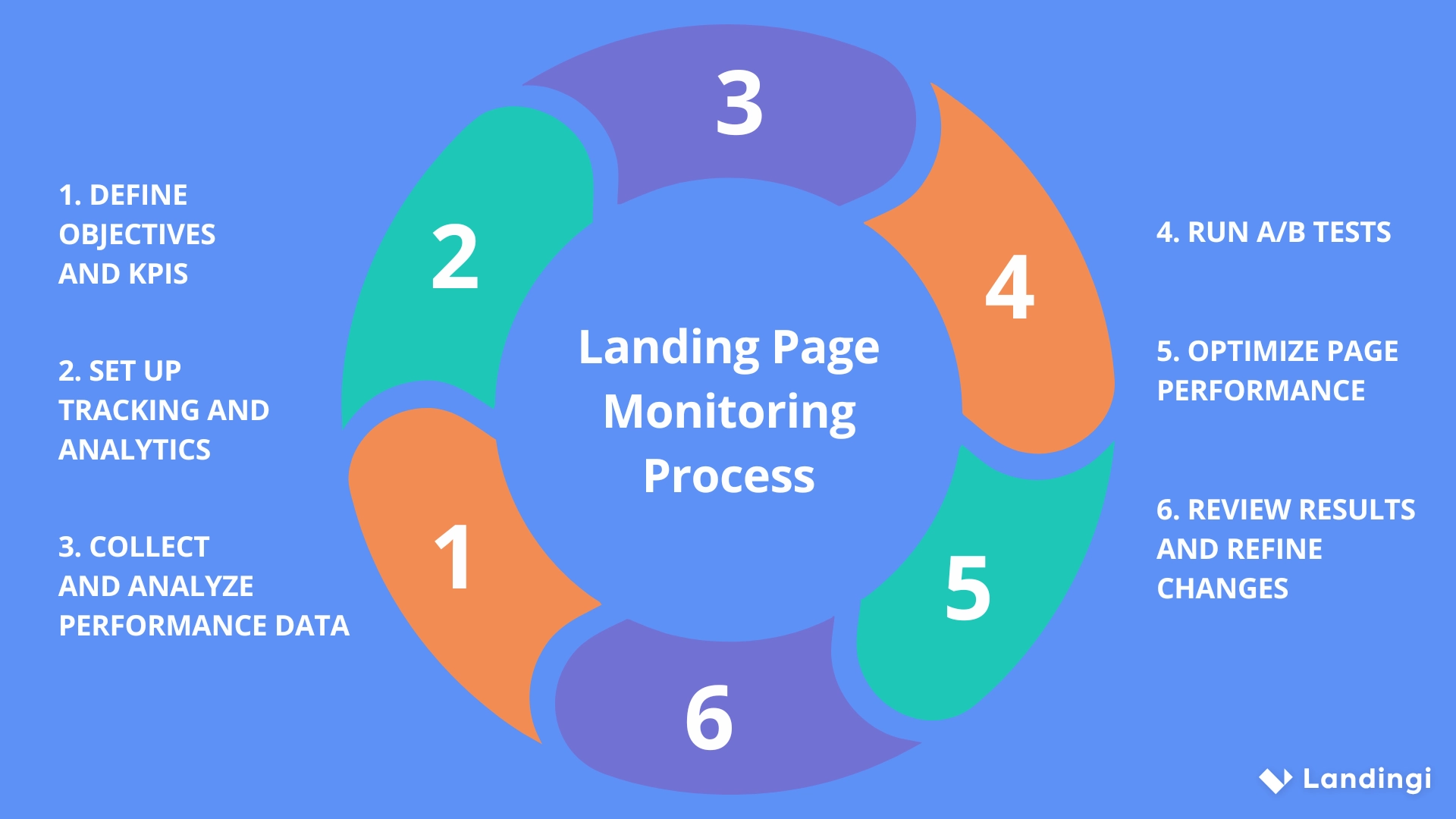
Landing page monitoring is a continuous improvement cycle rather than a one-time task. Repeating these six steps enables marketers to maintain high-performing landing pages that consistently support business outcomes and deliver strong user experiences.
5 Tips for Landing Page Monitoring – Best Practices
Effective landing page monitoring depends on consistent measurement, fast reaction to performance changes, and continuous validation of page elements. The following best practices help improve landing page performance and conversion rates over time.
1. Utilize comprehensive analytics tools
Landing page monitoring requires analytics tools that track traffic sources, user behavior, and conversion outcomes. Platforms such as Google Analytics provide visibility into how users reach and interact with a landing page. Multifunctional landing page platforms like Landingi combine page creation with built-in analytics and integrations, offering a centralized view of landing page performance and optimization opportunities. With Solis, this data is additionally interpreted by AI to provide personalized recommendations for improving landing page effectiveness based on actual user behavior.
2. Monitor real-time performance
Real-time monitoring enables fast identification of performance issues that affect user experience and conversion rates. Metrics such as sudden increases in bounce rate or slow page load times require immediate attention to prevent traffic loss.
3. Update and test landing pages regularly
Landing page performance declines when content, design, or messaging no longer match user expectations. Regular updates combined with A/B testing or multivariate testing help validate headlines, calls to action, visuals, and layout decisions. Continuous testing ensures that landing pages adapt to changing user behavior and technology standards.
Use Landingi to experiment with various page versions and find the best-performing one!
4. Set alerts for critical performance metrics
Performance alerts support proactive landing page management. Automated notifications for KPI anomalies, such as drops in conversion rate or spikes in bounce rate, enable rapid investigation and corrective action. Early detection limits negative impact on campaign results.
5. Use user feedback to complement analytics
Quantitative data explains what users do, but direct feedback explains why users behave in a certain way. Feedback forms and surveys placed on landing pages capture qualitative insights related to clarity, trust, and perceived value. User feedback helps identify usability issues that may not appear in analytics reports.
Landing page monitoring best practices support continuous improvement and long-term performance stability. A structured monitoring approach ensures that landing pages evolve alongside user needs and business objectives, maximizing conversion potential over time.
How to Monitor a Landing Page with GA4?
Monitoring a landing page with Google Analytics 4 (GA4) requires proper setup, event configuration, and regular performance analysis. GA4 enables landing page monitoring through event-based tracking, real-time data, and customizable reports that support ongoing optimization.
If GA4 is already installed, the initial setup step can be skipped.
#1 Set up GA4 on landing page
- Start by creating a GA4 property in the Google Analytics admin panel. Define the website name, reporting time zone, and currency, then complete the setup process.
- Next, create a web data stream and install the GA4 tracking code (gtag.js) on the landing page. The tracking script should be added to the <head> section of the page or deployed site-wide using a tag manager.
#2 Configure data streams
- Verify that the web data stream is correctly connected to the landing page. The measurement ID assigned to the stream confirms that user interactions and page events are sent to GA4. Correct data stream configuration ensures accurate tracking of landing page behavior.
#3 View built-in GA4 reports
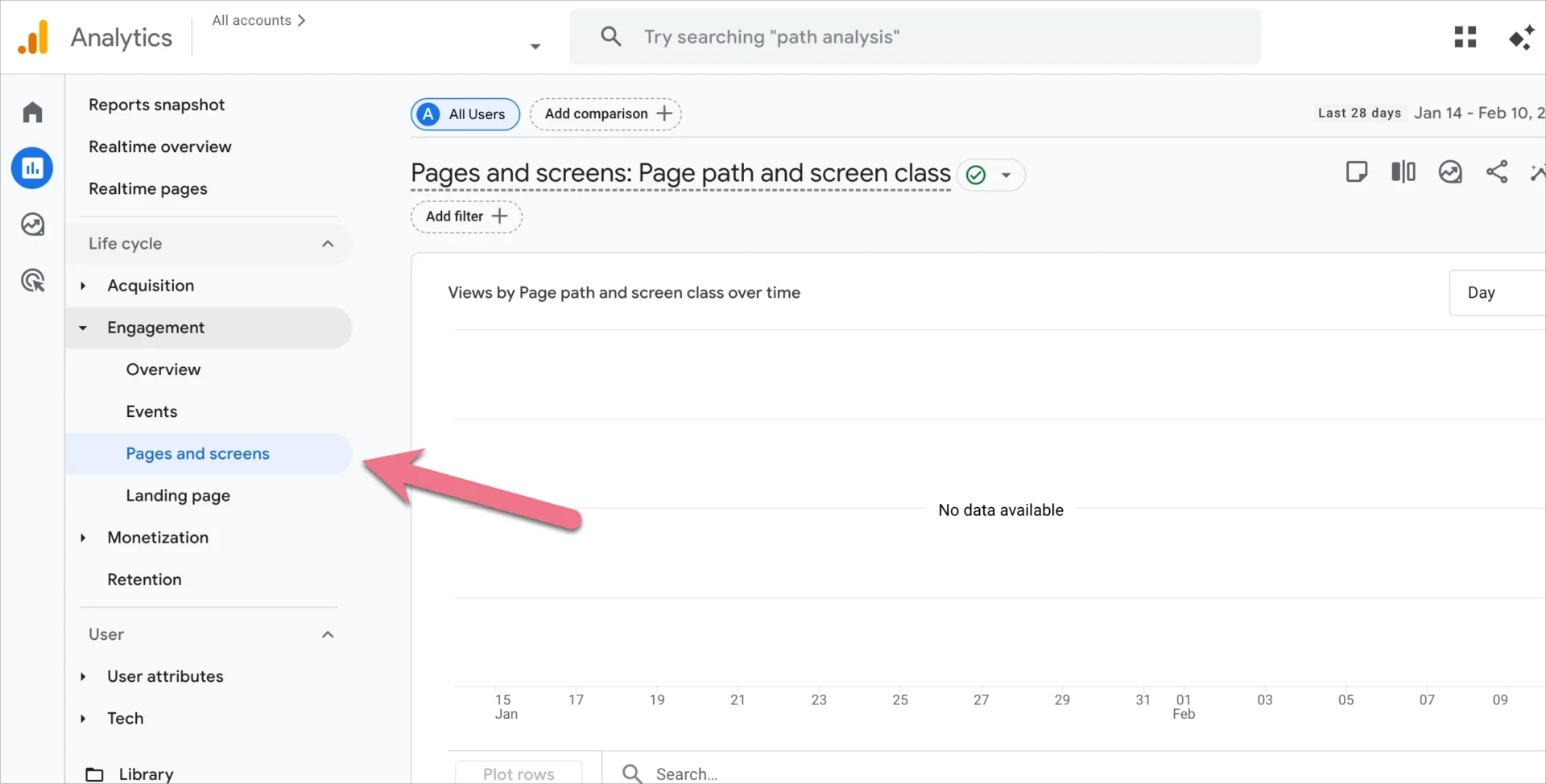
- GA4 provides predefined reports for landing page analysis. The Engagement → Pages and screens report shows key metrics such as engagement time, views, and bounce-related signals. These reports help evaluate how users interact with individual landing pages.
#4 Create custom reports in Explore
- For deeper analysis, use the Explore section in GA4 to build custom reports. Custom explorations allow analysis of landing page performance by dimensions such as page path, traffic source, device type, or geographic location. Tailored visualizations support more precise optimization decisions.
#5 Set up events and conversions
- GA4 uses events to track interactions such as button clicks, form submissions, or purchases. Existing events can be reviewed in the Events section, and new events can be configured as needed. Marking key events as conversions enables direct measurement of landing page goal completion.
#6 Monitor real-time landing page activity
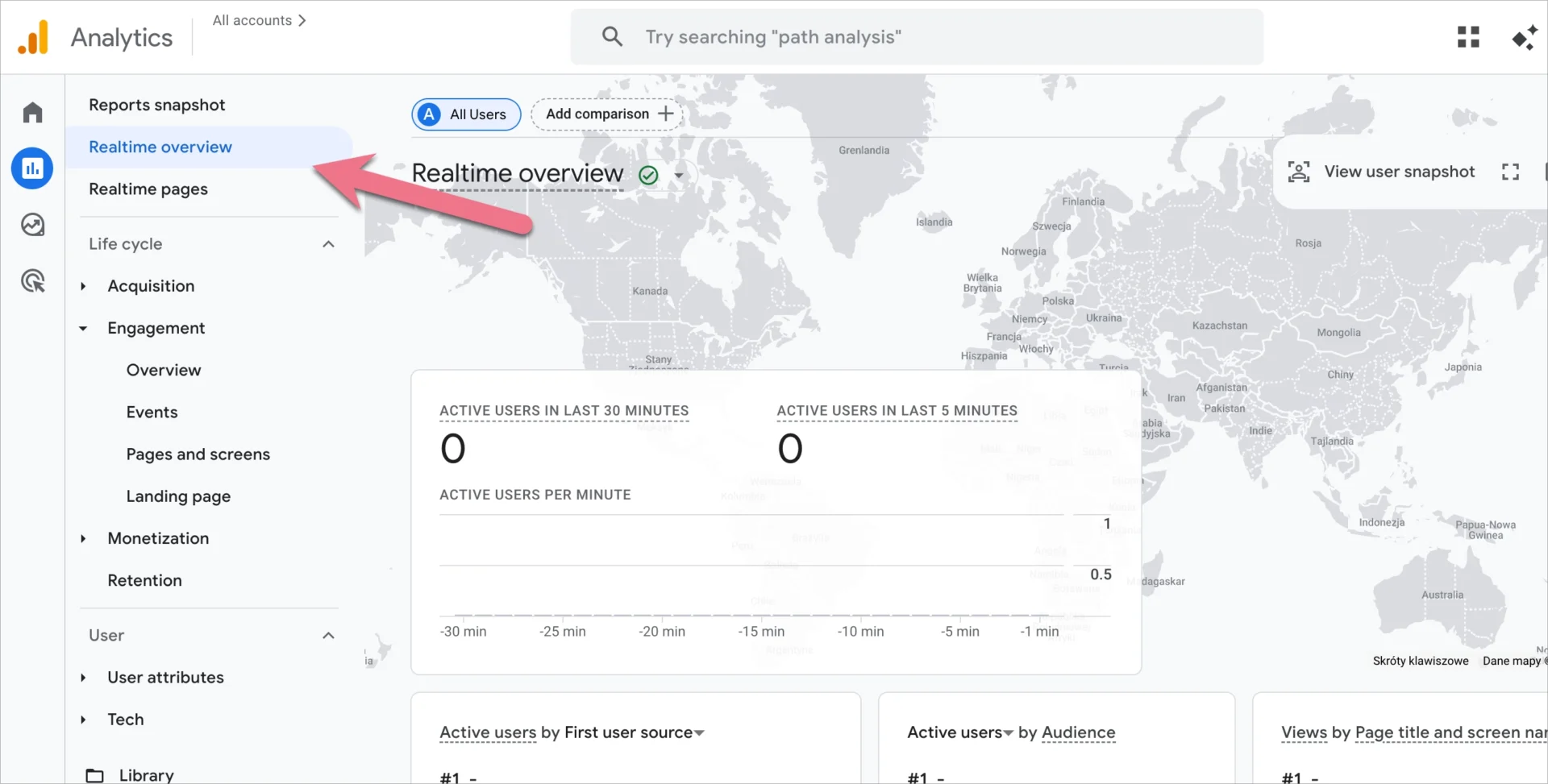
- The Realtime report displays live user activity, including active users, viewed pages, and triggered events. Real-time monitoring is useful during campaign launches, landing page updates, or traffic spikes to validate correct tracking and user response.
#7 Review performance and optimize continuously
- Landing page monitoring with GA4 requires regular review of trends in traffic sources, engagement, and conversion rates. Ongoing analysis helps identify what supports conversions and what creates friction. Performance insights should inform continuous landing page refinement.
GA4 reporting supports structured landing page monitoring, but the setup and configuration process can be complex. A simpler alternative is using a landing page platform with built-in analytics and GA4 integration, such as Landingi, which centralizes landing page creation, tracking, and optimization in one environment.
How to Monitor a Landing Page with EventTracker?
EventTracker is a built-in user behavior tracking tool available within the Landingi environment. EventTracker does not require additional installation, external scripts, or technical configuration. Landing page monitoring with EventTracker starts automatically after publishing a landing page and receiving traffic.
Sign up to craft a landing page and use EventTracker to track events and user behavior!
Because EventTracker is embedded directly into the landing page platform, marketers can track landing page performance without coding knowledge or third-party integrations. The collected interaction data can also be analyzed by Solis, an AI agent that generates insights and optimization recommendations for individual landing pages based on real usage patterns.
Landing page monitoring with EventTracker requires only two actions:
1. Open your landing page Dashboard
After publishing a landing page, access the Dashboard to view performance data and behavior reports.

2. Open the Events tab
Select the Events tab under the landing page thumbnail or use the guided onboarding view to explore available EventTracker features. The Events tab displays user interaction data in both chart and table formats.

The Events tab displays user interaction data in both chart and table formats.
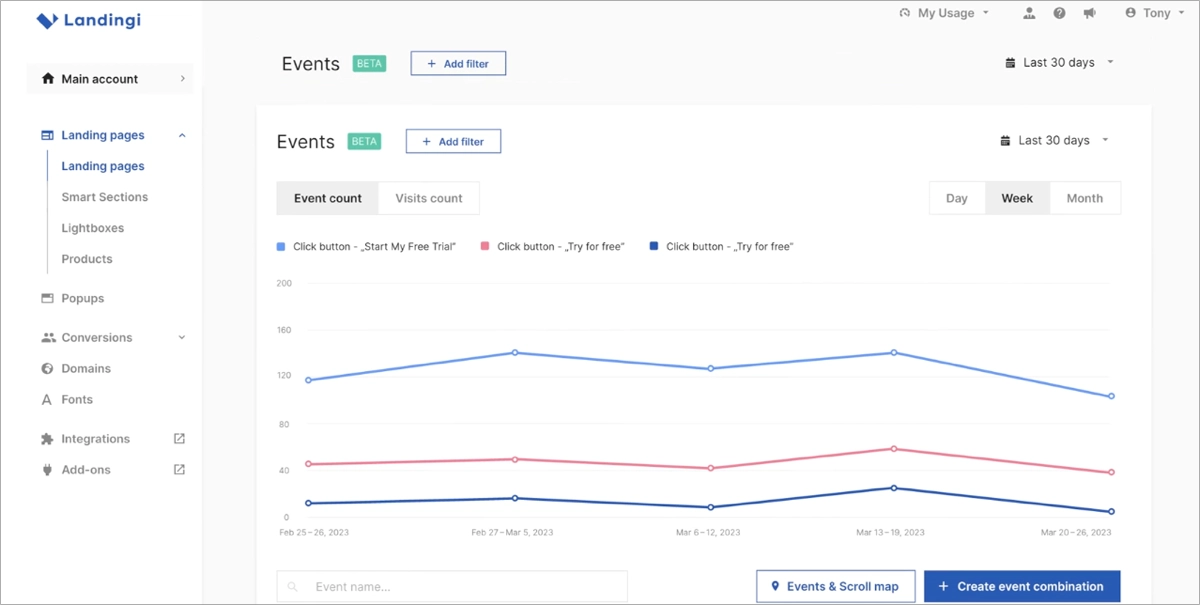

EventTracker data can be filtered using parameters such as browser language, A/B test variant, page type, and device category. Custom event combinations allow marketers to track specific interaction patterns and evaluate landing page performance at a granular level.

Scroll map in EventTracker visualizes how far users scroll on a landing page and which sections receive the most attention. The tool divides the landing page into six predefined scroll-depth ranges and applies color intensity to indicate section visibility and engagement.

Scroll map segments include:
- 0–10%
- 10–25%
- 25–50%
- 50–75%
- 75–90%
- 90–100%
Higher color intensity indicates that a larger share of visitors reached a given section of the page.
Scroll map is available from the landing page Dashboard under the Overview tab. The view supports desktop, tablet, and mobile comparisons. Hovering over a page section displays visitor counts and percentage reach for each device type, enabling quick identification of content drop-off points.


EventTracker interaction tracking capabilities
EventTracker supports tracking of both micro and macro conversion signals. The tool records interactions such as:
- button clicks,
- click events,
- lightbox activations,
- payment button interactions,
- form submissions,
- scrolling behavior.
EventTracker data provides a comprehensive view of landing page engagement and conversion paths. Tracked interactions are automatically sent to Google Analytics 4 and remain accessible within the GA4 reporting environment.
In addition to raw interaction data, Solis analyzes these events to identify patterns that influence landing page performance and highlights areas with optimization potential, such as form friction, content visibility issues, or mismatched traffic quality.
EventTracker supports rapid optimization by exposing user behavior patterns that affect conversion performance. Continuous access to interaction data enables fast adjustments to page layout, content hierarchy, and campaign execution.
In addition to core behavior tracking, EventTracker supports landing page optimization through several integrated capabilities.
- A/B testing support – EventTracker complements native A/B testing available in Landingi by providing detailed interaction and engagement data for each page variant. Behavior-level insights make it easier to identify which version performs better in terms of user engagement and conversions. Data-driven comparison replaces assumptions with measurable outcomes.
- Visitor behavior insights – EventTracker provides clear visibility into user behavior without requiring technical setup or advanced analytics knowledge. Automatic data collection enables marketers to understand how visitors interact with landing page elements and make informed optimization decisions based on real usage patterns.
- Google Ads optimization – through integration with Google Analytics 4, EventTracker data can be shared with Google Ads. User interaction signals support more precise audience targeting and campaign optimization. Behavior-based insights improve ad relevance and overall campaign efficiency.
Together, these capabilities position EventTracker as a practical tool for understanding landing page behavior and improving conversion performance through continuous, data-driven optimization.
FAQ – Landing Page Monitoring
This FAQ explains key aspects of landing page monitoring and outlines practical approaches to tracking performance across different traffic sources. The answers focus on tools, metrics, and processes that support measurable business outcomes.
What is the best landing page tracking tool?
The best landing page tracking tool is EventTracker by Landingi. EventTracker enables monitoring of user interactions and conversion behavior directly within the landing page environment, without requiring external scripts or technical setup.
EventTracker functionality includes:
- user interaction analysis,
- A/B testing support,
- micro and macro conversion tracking,
- no-code implementation,
- scroll map,
- real-time performance reporting.
How to monitor a PPC landing page?
Monitoring a PPC landing page requires tracking metrics directly tied to paid traffic efficiency. Key metrics include conversion rate, bounce rate, click-through rate, cost per conversion, and return on ad spend. These metrics can be tracked using tools such as Google Analytics.
A/B testing different landing page elements, such as headlines, calls to action, and layouts, supports continuous optimization. PPC landing page monitoring should also include regular evaluation of ad spend efficiency to confirm that campaigns generate profitable conversions.
Try Landingi now and optimize your paid campaigns for higher ROI!
How to monitor a social media landing page?
Monitoring a social media landing page focuses on understanding traffic quality and engagement generated by social platforms. Analytics tools such as Google Analytics or platform-specific insights like Facebook Insights help track traffic sources, user behavior, and conversions.
Key metrics for social media landing page monitoring include:
- click-through rate,
- engagement rate,
- bounce rate,
- conversion rate.
Regular A/B testing supports message and layout optimization. Qualitative inputs such as comments and direct user feedback help refine messaging and offers based on real-time audience response.
What are the key metrics to track when monitoring landing pages?
Effective landing page monitoring relies on tracking a defined set of performance and behavior metrics: conversion rate, bounce rate, traffic sources, pageviews, average time on page, CTR, form submission rate, and exit rate. Each metric explains a different aspect of user interaction and conversion effectiveness.
Conversion rate
Meaning: the percentage of visitors who complete a defined goal, such as a purchase or form submission.
Insight: conversion rate directly measures how effectively the landing page turns traffic into results.
Bounce rate
Meaning: the percentage of visitors who leave the landing page without interacting with any element.
Insight: bounce rate indicates whether the page content matches the intent and expectations of incoming traffic.
Traffic sources
Meaning: the channels that bring visitors to the landing page, such as organic search, paid ads, social media, or direct visits.
Insight: traffic source analysis supports channel-specific content and messaging optimization.
Pageviews and unique pageviews
Meaning: pageviews represent total page loads, while unique pageviews count visits from distinct users within a session.
Insight: pageview metrics help assess overall interest and repeated exposure to landing page content.
Average time on page
Meaning: the average duration users spend on the landing page during a session.
Insight: time on page reflects content engagement and relevance.
Click-through rate (CTR)
Meaning: the ratio of users who click a specific element, such as a call-to-action, to the total number of page visitors or element views.
Insight: click-through rate evaluates the effectiveness of calls to action and interaction design.
Form submission rate
Meaning: the percentage of visitors who complete and submit a form.
Insight: form submission rate reflects form usability, message clarity, and value proposition strength.
Exit rate
Meaning: the percentage of sessions that end on a specific landing page.
Insight: exit rate highlights potential drop-off points and content sections that may require optimization.
How does landing page monitoring improve conversion rates?
Landing page monitoring improves conversion rates by identifying performance gaps and optimizing page elements based on real user data. Monitoring relies on metrics such as conversion rate, bounce rate, engagement signals, and interaction data to detect friction points. Data-driven optimization improves user experience, increases engagement, and leads to higher conversion efficiency over time.
Discover landing page power – use Landingi to create high-converting pages for your business!
What are the common issues found during landing page monitoring?
Landing page monitoring frequently reveals issues that reduce page effectiveness and conversion potential. Common problems include:
- High bounce rates – indicate that visitors leave the page quickly due to mismatched intent, unclear messaging, poor design, or slow loading times.
- Low conversion rates – suggest issues with call-to-action clarity, value proposition strength, or offer relevance.
- Slow page load times – negatively affect user experience and search visibility, increasing abandonment risk.
- Poor mobile experience – reflects layout or usability problems on mobile devices, leading to lower engagement and conversions.
- Navigation issues – result from unclear structure or distracting elements that prevent users from completing the intended action.
Continuous landing page monitoring enables early detection of these issues and highlights exactly where optimization efforts should focus to improve conversion performance.
How can A/B testing be integrated into landing page monitoring?
A/B testing integrates naturally into landing page monitoring when testing and analytics operate within a single environment. Platforms such as Landingi allow marketers to create landing page variants and distribute traffic evenly between versions. Performance data collected through EventTracker enables comparison of engagement and conversion metrics for each variant. Test results support data-driven decisions and systematic landing page optimization.
How can landing page monitoring be automated?
Landing page monitoring can be automated through a combination of tools and workflows:
- Using multifunctional landing page platforms – solutions such as Landingi automatically track user interactions, scroll behavior, and conversions through built-in tools like EventTracker.
- Integrating analytics and CRM systems – connecting platforms such as Google Analytics with CRM tools enables automated data collection and funnel-level reporting.
- Setting performance alerts – automated alerts notify teams of significant metric changes, such as sudden bounce rate increases or conversion drops, enabling fast response.
Try Landingi now and monitor your landing pages effortlessly!
Monitor Your Landing Pages with Landingi
After understanding landing page monitoring principles and best practices, the next step is selecting tools that match your monitoring maturity – baseline KPI reporting, behavior analysis, and testing workflows that can be executed consistently. Landingi combines landing page creation with built-in monitoring and optimization features. Tools such as EventTracker enable detailed tracking of user interactions, while native A/B testing supports data-driven comparison of page variants.
Effective landing page monitoring depends on ongoing evaluation and refinement. Continuous analysis of performance data helps align page structure, content, and offers with user expectations and changing market conditions. With a unified landing page platform, marketers can make informed decisions, optimize conversion paths, and scale results without relying on fragmented tools.
Start monitoring landing pages with Landingi and turn performance data into measurable conversion growth.






